Picture this: It is 9:00 AM on a Tuesday. You are staring at a blinking cursor. You know you need to post something to keep your brand alive, but the creative well is dry. You start scrolling through old photos, frantically searching for inspiration, while the anxiety of “posting panic” sets in. We have all been there. It is the chaotic intersection where good intentions meet a lack of planning. But there is a better way. It is not about working harder or being more creative in the moment. It is about building a system that works for you.
That system is a social media content calendar.
A content calendar is far more than just a diary or a simple schedule of dates. It is the strategic backbone of your entire digital presence. It is a living roadmap that bridges the gap between random, sporadic activity and a scalable marketing strategy that drives real lead generation. Success on social media is rarely an accident. It is engineered.
In this guide, we are going to move beyond the basics. We will explore why a content calendar is the ultimate tool for avoiding burnout, how to align your posts with business goals, and the specific workflows that allow teams to collaborate seamlessly. We will look at the tools, from simple spreadsheets to complex automation software, that make this process effortless. Whether you are a solo entrepreneur or managing a team of ten, this article will serve as your blueprint for turning social media from a daily chore into a powerful engine for growth.
Why You Need a Social Media Content Calendar
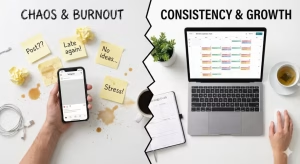
You might be thinking that a calendar is just extra paperwork. You might feel that you are spontaneous and that your audience likes your raw, unplanned thoughts. While authenticity is important, relying on spur-of-the-moment ideas is a recipe for disaster in the long run. A content calendar is the safety net that ensures your business keeps running even when you are tired, busy, or uninspired.
Consistency is Queen
The algorithms that run platforms like Instagram, LinkedIn, and TikTok love one thing above all else: consistency. When you post sporadically, the algorithm assumes you are not a reliable source of content. It stops showing your posts to new people. However, when you use a calendar to plan a steady stream of posts, you teach the algorithm that you are a serious player.
A content calendar helps you show up every single day or week without fail. You do not have to wake up and decide to be consistent. The decision was already made weeks ago when you filled out the slots in your calendar. This consistency builds trust with your audience. They begin to expect your content, and that anticipation is the first step toward building a loyal community.
Strategic Alignment
It is easy to get caught up in the vanity metrics of likes and comments. But if those likes do not lead to sales or website visits, they are just empty numbers. A content calendar forces you to look at the big picture. When you fill out your calendar, you can see if your posts actually align with your business goals.
For example, if you are launching a new product next month, your calendar should be filled with “teaser” posts this week. If you have a holiday sale coming up, your calendar ensures you are talking about it well in advance. Without a calendar, you might remember to post about your sale the day before, which is often too late to catch the customer’s attention. The calendar turns your social media from a megaphone into a strategic laser beam.
Resource Management and Burnout Prevention
Burnout is real. Trying to think of a witty caption or edit a video every single day drains your mental battery. This is where the magic of “batching” comes in, which is only possible with a content calendar.
When you have a plan, you can dedicate one afternoon to writing all your captions for the month. You can spend one day shooting all your videos. Then, you plug them into your content calendar. For the rest of the month, you can relax. You do not have to scramble. The calendar does the heavy lifting for you. This frees up your brain space to focus on other parts of your business, like serving your customers or developing new products.
Cross-Functional Collaboration
If you work with a team, a content calendar is non-negotiable. Imagine trying to coordinate a graphic designer, a copywriter, and a manager without a central plan. It would be chaos. The copywriter would not know what topic to write about, and the designer would not know what image to create.
A shared calendar acts as the single source of truth. Everyone looks at the same document. The designer sees that on Friday, the content calendar calls for an infographic. The writer sees that on Monday, the calendar needs a blog post summary. This synchronization prevents miscommunication and ensures that everyone is moving in the same direction. It transforms a group of individuals into a cohesive machine.
Data Tracking and Feedback Loops
You cannot improve what you do not measure. When you post randomly, it is hard to look back and see what worked. But a content calendar gives you a historical record. You can look back at your calendar from last month and see exactly what you posted and when.
Did the video you posted on Tuesday get more engagement than the photo on Thursday? Your calendar holds that data. You can use your calendar to spot patterns. Maybe your audience loves educational tips but ignores inspirational quotes. By reviewing your past calendar entries, you can refine your strategy for the future. The content calendar becomes a learning tool that helps you get smarter over time.
Main Components of a High-Performing Content Calendar

A content calendar is more than just dates on a grid. To truly work, it needs to track specific details. If your calendar is too vague, it will not be helpful. If it is too complex, you will never use it. Here are the essential parts of a successful calendar.
Platform Specifics
Not all social media platforms are the same. What works on LinkedIn often fails on TikTok. Your content calendar needs to account for this. You should have a section in your calendar for each platform you use.
For instance, your content calendar might have a row for Instagram and a separate row for Twitter. The Instagram entry in your calendar might require a square image and thirty hashtags. The X entry in the same calendar might only need a short sentence and one link. By separating these in your calendar, you ensure that you are tailoring your message to the specific audience on each app.
Content Pillars (The 80/20 Rule)
One of the biggest mistakes people make is selling too much. If every post in your content calendar is “Buy my product,” people will unfollow you. You need a mix. We call these “Content Pillars.”
A good rule of thumb for your calendar is the 80/20 rule. 80% of the posts in your content calendar should be educational, entertaining, or inspiring. These add value to the reader’s life. Only 20% of the posts in your calendar should be promotional or sales-focused.
When you look at your calendar for the week, you should see a balance. If you see five sales posts in a row on your calendar, you know you need to adjust. The content pillars help you categorize your ideas so you never run out of things to say. Common pillars for a content calendar include “Behind the Scenes,” “Tips and Tricks,” “User Testimonials,” and “Industry News.”
Asset Management
A post is made of two things: the words (copy) and the visual (creative). Your content calendar needs to tell you where these things live. It is frustrating to be ready to post but not be able to find the photo you wanted to use.
Your content calendar should have a column for “Link to Asset.” This could be a link to a Google Drive folder, a Dropbox file, or a Canva design. When it is time to post, you open your calendar, click the link, and grab the image. It saves you minutes every day, which adds up to hours every month. Organized asset management within your calendar streamlines the entire publishing process.
Status Indicators
Where is the post in the production line? Is it just an idea? Is it written but not edited? Is it scheduled? Your content calendar needs to track this.
Use color-coding in your calendar to show status.
-
Yellow: Drafting (Working on it)
-
Orange: In Review (Needs approval)
-
Green: Scheduled (Ready to go)
-
Blue: Published (Done)
When you glance at your content calendar, you should see a wave of green approaching. If you see too much yellow for tomorrow’s slot in the calendar, you know you need to hurry up. These status indicators make the calendar a project management tool.
How to Build Your Social Media Content Calendar (Step-by-Step)
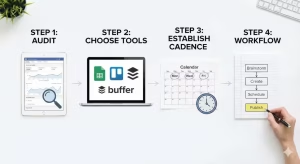
Now that we know what goes into it, let’s build one. Creating a content calendar does not have to be scary. It is a step-by-step process.
Step 1: Conduct a Social Media Audit
Before you look forward to your new content calendar, you must look back. What are you doing right now? Log into your accounts. Look at your numbers.
This audit helps you decide what belongs on your content calendar. If you have a Facebook page that hasn’t had a like in three years, maybe it shouldn’t be on your calendar at all. Focus your energy. Identify your “Ghost Town” channels and cut them loose. Look for your “Star” channels where engagement is high. Your content calendar should focus heavily on these Star channels. This audit ensures your calendar is built on data, not guesses.
Step 2: Choose Your Tools (Entities & Software)
You need a place to host your calendar. There are three main levels of tools you can use.
Level 1: Spreadsheets.
Tools like Google Sheets or Excel are fantastic for beginners. They are free and customizable. You can make columns for dates, copy, and links. A spreadsheet-based content calendar is simple and effective.
Level 3: Project Management Tools.
If you have a team, you might want something like Trello, Asana, or Monday.com. These allow you to assign tasks. You can tag a writer in the content calendar card when it is their turn to work. These tools turn your calendar into a collaborative workspace.
Level 3: Dedicated Schedulers.
Tools like Sprout Social, Hootsuite, Buffer, and CoSchedule are the Ferraris of the content calendar world. They allow you to plan the post and then publish it automatically. You type the post into the calendar inside the software, and it posts it for you while you sleep. While these cost money, the time they save is often worth it.
Step 3: Establish Your Posting Cadence
How often should you post? Your content calendar needs to reflect a realistic schedule. Do not commit to posting five times a day if you are a one-person show. You will fail, and you will abandon your calendar.
Start small. Maybe your content calendar lists three posts a week for Instagram and two for LinkedIn. That is achievable. Once you master that, you can add more slots to your calendar. Also, look at your analytics to find the best times. If your audience is online at 8 PM, your calendar should schedule posts for 8 PM.
Step 4: The Content Workflow
This is how the sausage gets made. You need a workflow for filling up the content calendar.
-
Brainstorming: Once a month, sit down and dump ideas. Put them in an “Ideas” tab in your content calendar.
-
Asset Creation: Make the images or videos for the chosen ideas.
-
Copywriting: Write the captions.
-
Approval: Have someone (or yourself) check for typos.
-
Scheduling: Lock it into the content calendar.
By following this workflow, your content calendar stays full. You never have to stare at that blank screen again because your content calendar is always one step ahead of you.
Advanced Strategies for 2025
The digital world moves fast. A calendar from 2015 won’t work today. Here are the advanced tactics you need to integrate into your modern content calendar.
Repurposing Content
You do not need to create new content from scratch every day. You just need to repackage it. This is called repurposing, and your content calendar is the best place to plan it.
Let’s say you write a great blog post. Add that to your calendar on Monday.
On Tuesday, pull a quote from that blog and make it an Instagram graphic. Add that to the calendar.
On Wednesday, record a short video summarizing the blog for TikTok. Add that to the calendar.
On Thursday, turn the main points into a carousel for LinkedIn. Add that to the calendar.
Suddenly, one idea has filled four slots in your content calendar. This is working smarter, not harder. Your calendar helps you visualize how one piece of content can travel across the web over time.
Trend Jacking vs. Evergreen Content
“Evergreen” content is stuff that is always true. Tips on “how to tie a tie” will be relevant in ten years. “Trend jacking” is jumping on a meme or a news story that is popular right now.
Your content calendar needs both. You can plan evergreen content months in advance in your calendar. But you need to leave blank spaces or “flex slots” in your content calendar for trends. If a new meme takes over the internet on Tuesday morning, you want to be able to post about it by Tuesday afternoon. If your calendar is too rigid, you miss these opportunities. Keep your content calendar flexible enough to be relevant.
The Role of AI
Artificial Intelligence is here. Tools like ChatGPT or Jasper can help you fill your calendar faster. You can ask AI to “Give me 10 ideas for a content calendar about dog walking.”
However, be careful. AI can sound robotic. Use AI to generate the ideas for your content calendar, but write the final captions yourself. Use your human voice. Let AI be the assistant that helps you brainstorm for your calendar, but do not let it be the boss.
Geo-Targeting and Localization
If you have customers all over the world, your content calendar gets more complex. 9 AM in New York is different from 9 AM in London.
Advanced content calendar strategies involve time zones. You might need to schedule a post twice in your calendar: once for your US audience and once for your European audience. Some advanced tools allow you to target specific countries. If you are a global brand, your content calendar needs to respect the clock and the culture of your different audiences.
Your Questions Answered about Social Media Content Calendars
You probably have some specific questions. Here are the most common things people ask about building a content calendar.
What is the best free social media content calendar tool?
If you have zero budget, Google Sheets is the winner. It is cloud-based, so you can access your content calendar from your phone or laptop. There are thousands of free templates online. Just search for “Google Sheets content calendar template” and you will find one. It does everything you need to get started. Trello also has a free tier that is very visual and great for moving cards around your content calendar.
How far in advance should I plan my social media content?
I recommend the “Monthly Macro, Weekly Micro” approach for your content calendar.
Plan the big themes (holidays, launches) one month in advance in your content calendar.
Then, fill in the specific captions and images one week in advance.
This keeps your content calendar organized but leaves room for changes. Planning six months out is usually too far because the internet changes too fast. Your content calendar needs to stay fresh.
What should be included in a social media calendar?
At a minimum, every entry in your content calendar should have:
-
Date and Time: When is it going live?
-
Platform: Where is it going?
-
Topic/Pillar: What is it about?
-
The Copy: The actual words of the post.
-
The Creative: The image or video file.
-
Link: The URL you want people to click (if any).
-
Status: Is it done?
If your content calendar has these seven things, you are golden.
How do I create a content calendar for multiple clients?
If you are a freelancer, you need a content calendar that can handle multiple businesses. Do not put them all on one tab. It will get messy.
Use a tool like Asana or ClickUp where you can have a separate “Workspace” or “Board” for each client’s content calendar. This keeps Client A’s posts separate from Client B’s. You do not want to accidentally post a dog photo to a cat food company’s account because your content calendar was confused!
Measuring Success: KPIs and Analytics
You have built the content calendar. You are posting. Now, is it working? Your calendar should help you answer this.
Metric Tracking
Add a column to your content calendar called “Results.” After a post has been up for a week, go back to your calendar and type in how it did. How many likes? How many shares?
This transforms your calendar from a planning tool into a report card. You will start to see that “Oh, every time I post a video on Friday in my content calendar, it does well.”
A/B Testing
You can use your calendar to run science experiments. This is called A/B testing.
In your content calendar, plan to post a photo of a person on Monday.
Then, in your calendar, plan to post a photo of a product on the next Monday with the same caption.
Compare the results in your calendar. Which one won? This data helps you make better decisions for next month’s content calendar.
Quarterly Reviews
Every three months, do a deep dive. Look at your content calendar as a whole. Did you stick to the plan? Did the calendar help you grow?
Maybe you find that you are posting too much and burning out. Adjust the content calendar to have fewer posts.
Maybe you find that LinkedIn is your best performer. Adjust the content calendar to focus more on LinkedIn.
The content calendar is not set in stone. It should evolve as your business evolves.
Conclusion
Social media can feel like a noisy, crowded room where everyone is shouting. It is easy to feel lost. It is easy to feel like you are just throwing spaghetti at the wall. But when you implement a robust content calendar, you stop guessing. You start executing.
A content calendar gives you the freedom to step away from your phone, knowing that your brand is still working for you. It gives you the mental clarity to be creative, rather than reactive. It aligns your daily actions with your biggest dreams.
Whether you use a simple spreadsheet or a fancy software suite, the most important step is simply to start. Download a template. Fill in the first week of your content calendar. Watch how the stress melts away.
Your audience is waiting to hear from you. With your new content calendar, you will ensure they never miss a word.
Would you like me to generate a specific 4-week sample content calendar table for a fictional coffee shop brand to illustrate these points?