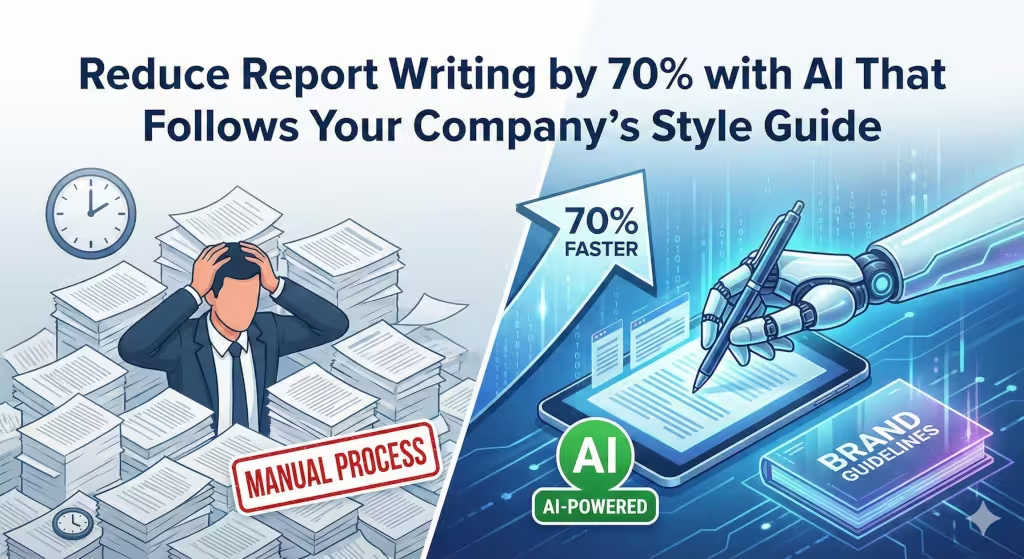
Writing reports is often the most boring part of a job. Many smart people spend hours every week typing out data they already know. They have to worry about the right tone. They have to follow a strict style guide. This takes time away from real work. In our experience with small businesses and big firms, this “documentation drag” is a silent killer of growth. But now, things have changed. You can now reduce report writing by 70% with AI. This is not just a dream. It is a technical reality.
The secret is not just using any AI. It is using AI that knows your rules. It is about a system that understands your company style guide. When the machine knows how you speak, it does the heavy lifting for you. You stop being a just a writer and start being a strategist. This article will show you exactly how this works. We will look at the tools, the logic, and the steps to make it happen.
The Mechanics of 70% Efficiency Gains
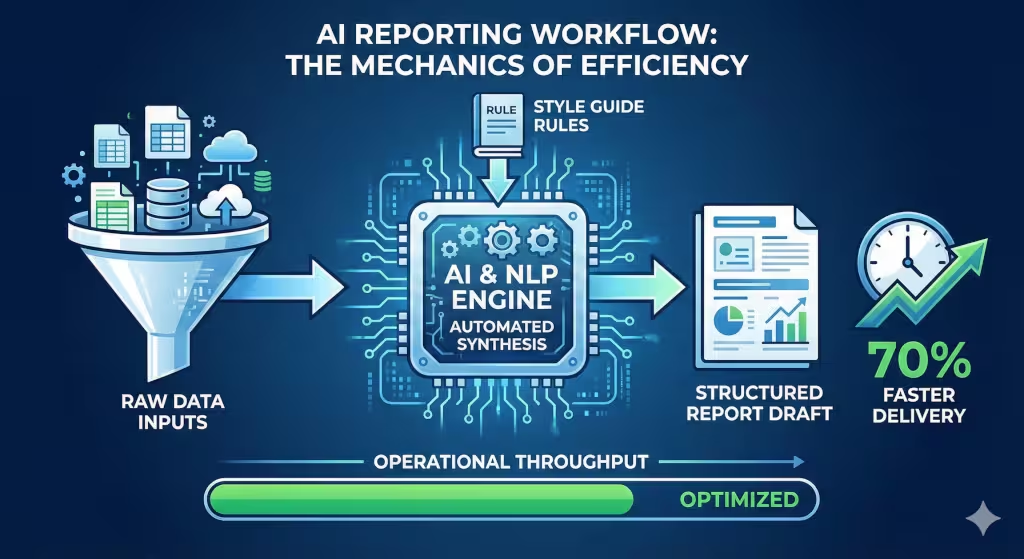
How do we get to a 70% gain? It comes down to two things: speed and structure. Most of the time in report writing is spent looking at a blank page. You have the data in a spreadsheet. You know what it means. But putting it into sentences is slow. AI removes that start-up cost. It takes raw numbers and turns them into a story in seconds.
This process is called automated data synthesis. Think of it like a kitchen. The raw data are the ingredients. The AI is the chef. The style guide is the recipe. When you have a good recipe, the chef can work much faster. In the past, people had to be both the chef and the person who wrote the recipe every single time. Now, the machine handles the repetitive parts. You just do the final taste test.
Efficiency also comes from something called Natural Language Processing or NLP. This is a branch of computer science that helps machines read and write like humans. In the last few years, NLP has become very good. It can now spot trends in your data that you might miss. It can see that sales went up in July and link it to a specific marketing campaign. When the machine does this analysis during report writing, you save hours of thinking time.
Operational throughput is another big term here. It just means how much work you can get done in a day. If you spend five hours on a report, your throughput is low. If you spend 30 minutes, it is high. By using AI to follow your style guide, you remove the back-and-forth of editing. Most edits happen because someone didn’t follow the rules. If the AI is programmed with the rules from the start, those errors vanish.
How AI Learns Your Company’s Style Guide

A style guide is a set of rules for how a company writes. It covers things like using the Oxford comma. It says if you should be formal or casual. Teaching this to an AI is the most important step. Without this, the AI sounds like a robot or a stranger. We use a method called few-shot prompting to fix this.
Few-shot prompting is simple. You give the AI a few examples of your best work. You might say, “Here are three reports we wrote last month. Look at how we use short sentences. Notice how we never use slang.” The AI looks at these patterns. It builds a map of your voice. This is much better than just telling it to “be professional.” Professional can mean many things. Examples give it a target.
We also use something called constraints. In computer science, a constraint is a rule the machine cannot break. For report writing, you might set a constraint that says “never use the passive voice” or “always use bullet points for lists.” When the AI generates text, it checks these rules. If a sentence breaks a rule, it rewrites it. This ensures data integrity and brand consistency.
The technical name for this is register and tone alignment. Register is the level of formality. Some companies want to sound like a trusted friend. Others want to sound like a cold, hard expert. Your style guide tells the AI which one to pick. When the machine gets this right, the person reading the report writing won’t even know a machine helped. It sounds exactly like you.
Top AI Tools for Branded Report Writing
Not all tools are equal. Some are good for poems, but bad for business. If you want to cut your report writing time, you need a tool that can handle a brand kit. A brand kit is a digital folder where you save your rules.
Jasper AI is a leader in this space. It has a feature specifically for brand voice. You can upload your style guide directly. It then applies those rules to everything it writes. It is great for marketing teams and small businesses that need a consistent look.
OpenAI has tools like ChatGPT and the newer o1 models. These are very smart. They can follow complex logic. If your report writing involves heavy data analysis, these tools are excellent. You can create a “Custom GPT” which is like a tiny version of the AI that only knows your company rules. This makes it very easy for your whole team to use.
Grammarly Business is another key player. It doesn’t just check for typos. it checks for style. You can upload your company style guide to Grammarly. As you do your report writing, it will highlight things that don’t fit your brand. It is like having an editor sitting on your shoulder. It helps you stay on track in real-time.
Microsoft Copilot is also worth watching. Since many businesses use Word and Excel, Copilot is built right in. It can look at your Excel sheets and start the report writing process inside Word. Because it is part of the Microsoft ecosystem, it can also see your previous documents to learn your style. This is a huge win for efficiency.
Common Questions about AI Report Writing
When people start using AI for report writing, they usually have the same few questions. Let’s look at the most common ones.
How can I use AI to write reports? The best way is to follow a simple workflow. First, gather your data. Second, choose your tool. Third, give the AI your data and your style guide. Fourth, ask it to create an outline. Fifth, tell it to write the sections one by one. Never ask it to write a 20-page report all at once. It works better when you do it in small steps.
Can AI follow a specific style guide? Yes, it can. This is done through something called a system prompt. A system prompt is a set of permanent instructions. You tell the AI, “You are an expert at report writing for WebHeads United. You must always use a direct tone and follow this style guide.” Once this is set, the AI will remember it for every task.
What are the risks of using AI for report writing? The biggest risk is “hallucination.” This is when the AI makes up facts or numbers. To stop this, you must always provide the raw data yourself. Don’t ask the AI to find the data on the web. Give it the data and tell it to only use what you provided. You should also have a human review every final draft. We call this “Human-in-the-Loop.” It keeps things safe and accurate.
Implementing a Style-First AI Workflow
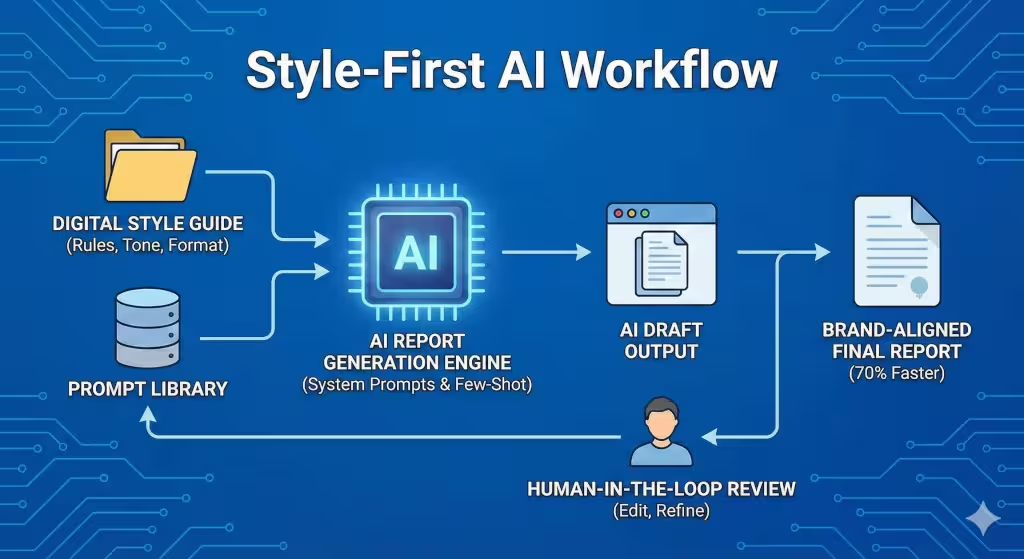
To really reduce your report writing by 70%, you need a plan. You can’t just wing it. Here is how you set up a winning workflow.
First, you must audit your current work. Look at the last ten reports your company produced. What was good? What was bad? Identify the patterns. This forms the base of your digital style guide. You need to know what “perfect” looks like before you can tell a machine to copy it.
Second, you build your prompt library. A prompt is the instruction you give the AI. For report writing, you need prompts for different sections. You might have a “Summary Prompt” and a “Data Analysis Prompt.” Each one should mention your style guide. For example, “Write a summary of this data. Use the voice of our company style guide. Keep it under 200 words.”
Third, you must train your team. AI is a tool, not a magic wand. If people don’t know how to use it, they won’t save time. They might even spend more time trying to fix bad AI output. Show them how to give feedback to the machine. If the AI writes something too long, they should know to say, “This is good but too wordy. Please cut the word count by 30% while keeping the main points.”
Finally, you need a feedback loop. Every month, check the reports. Are they getting better? Is the report writing process actually faster? Use the data to tweak your style guide and your prompts. This is how you move from a pilot project to a fully scaled system.
The Role of Data Integrity in Report Writing
One thing is clear: if the data in your business is wrong, the report is useless. When you use AI for report writing, you must be careful. Ensure that the correct data is going in by double-checking it.
AI models are trained on the whole internet. The internet has a lot of wrong information. If you just ask an AI to write about “market trends in Omaha,” it might use old or wrong data. This ruins your credibility. To maintain high standards, you should use a technique called Retrieval-Augmented Generation or RAG.
RAG is a fancy name for a simple idea. It means the AI looks at your specific documents before it writes. Instead of guessing, it “retrieves” the facts from your database. Then it “generates” the text. This is the gold standard for professional report writing. it ensures that every number in your report is a number you trust.
Think of RAG as an open-book test. A regular AI is trying to answer from memory. An AI using RAG has the textbook open in front of it. Which one would you trust more? For small business owners, this is a game changer. You can feed the AI your local sales data, your customer reviews, and your local SEO stats. Then, the AI does the report writing based only on those facts. This protects your reputation and makes your reports much more valuable.
Scaling Your Output Without Losing Quality
Many people fear that using AI will make their work look cheap. They think that if they do more report writing, the quality will go down. This is only true if you don’t use a style guide.
When you have a strong set of rules, you can scale without fear. You can go from writing one report a month to writing ten. This helps you reach more customers. It helps you keep your team better informed. In the world of local SEO and small business, information is power. The faster you can turn data into a report, the faster you can make a decision.
If you are a business owner in a place like New York City, you know how fast things move. You don’t have time for slow report writing. You need to know which keywords are driving traffic right now. You need to know if your local SEO strategy is working. AI helps you stay ahead of the competition by giving you these insights in real-time.
Scaling also means you can customize. In the past, you might write one report for the whole company. With AI, you can write one for the sales team, one for the tech team, and one for the CEO. The AI can take the same data but change the tone and focus based on who is reading it. This is a massive value-add. Each person gets exactly what they need in the style they prefer.
Why Human Oversight Still Matters
Even with a 70% gain in speed, the human is the most important part. AI is a great assistant, but it is a poor leader. You are the one who knows the business. You are the one who knows the customers in your community.
The AI handles the “what” and the “how.” It writes the words and follows the style guide. But you provide the “why.” Why are we doing this report? Why does this data matter? Your insight is what makes a report truly great. During the report writing process, your job is to add that “last mile” of value.
It is advised that businesses spend the time they save on deeper thinking. If AI saves you four hours on a report, don’t just go home early. Use two of those hours to look for new trends. Use the other two to talk to your team. This is how you grow a business. You use technology to handle the boring stuff so you can focus on the innovation.
Competent professionals know when to delegate and when to lead. Using AI for report writing is a form of delegation. You are delegating the drafting, the grammar checking, and the style alignment. You are leading the strategy and the final message. This balance is the key to success in the modern business world.
The Future of Search and Local SEO Reporting
As the internet changes, how we track success changes too. Search engines are getting smarter. They look for high-quality content that helps people. This applies to your internal reports as well as your public blog posts.
When you use AI that follows your style guide, you are creating a “data footprint” that is consistent. This helps with your overall brand authority. In my work with WebHeads United, I see that companies with a clear voice rank better. They are more trusted by both users and search engines.
Your report writing should reflect this. If you are tracking local SEO metrics, your reports should be easy to read and act on. They should use the keywords that matter for your business. By using AI, you can ensure that your reports always focus on the right data points. You can track things like “near me” searches or local map rankings with much more detail.
In the future, we might not even “read” reports the way we do now. We might ask an AI agent to “tell me the top three things from the monthly report.” If your report writing was done correctly with a style guide, the AI agent will be able to give you a perfect answer. This is the next level of business intelligence.
Take Back Your Time
We have covered a lot of ground. We looked at how to reduce report writing by 70%. We saw how style guides and AI work together. We talked about the best tools like Jasper and ChatGPT. We even looked at the technical side of things like RAG and data integrity.
The main takeaway is simple: your time is your most valuable asset. If you are spending it on manual report writing, you are wasting money. By embracing AI that follows your rules, you can work faster and better. You can focus on the innovation and the community-building that makes your small business special.
Start small. Pick one type of report. Create a style guide for it. Then, try using an AI tool to write the first draft. You will be amazed at how much faster you can work. As you get better at it, you will find more ways to save time.
In short, don’t let documentation hold you back. Use the tools available to you. Scale your business. Lead with data. And most importantly, stay true to your brand voice.