Let’s be direct: You are here because you noticed your battery percentage dropping faster than usual, or perhaps you are a business owner worried that your new app will annoy customers by killing their phones.
The short answer is yes, geofencing drains your battery. But it is not the villain it used to be.
Ten years ago, location tracking was a battery vampire. It would “gulp” power by keeping your GPS chip active constantly, looking for satellites in the sky. Today, thanks to smarter algorithms and efficient hardware, modern geofencing “sips” power rather than gulping it.
The reality is that not all geofencing is created equal. There is a massive difference between a navigation app like Google Maps (which uses “Active Tracking”) and a retail app using “Passive Region Monitoring.”
In this article, we are going to look at the data. We will dismantle the myths, explain exactly how your phone decides when to use power, and give you the actionable steps to stop the drain, whether you are a user or a developer.
The Technical Hierarchy of Location Services
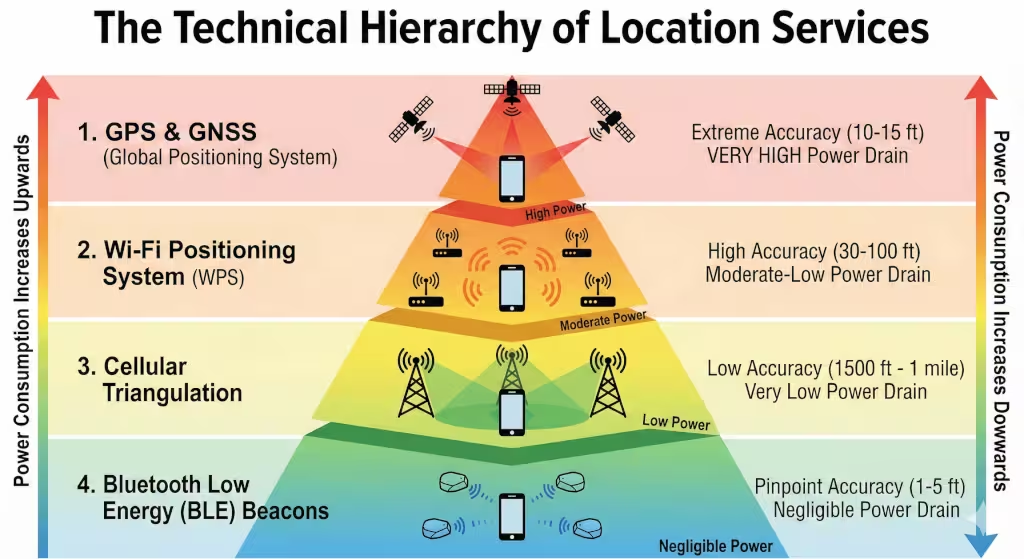
When you toggle that little green switch on your phone labeled “Location,” you are not turning on a single machine. You are activating a complex, multi-layered system of radios, sensors, and algorithms.
To understand why geofencing impacts your battery life, you must understand the “hierarchy of cost.” Your phone is programmed to always use the cheapest method possible to find where you are. It only calls in the “heavy machinery” when absolutely necessary.
Here is the deep dive into the four distinct technologies your phone uses to locate you, ranked from the most power-hungry to the most efficient.
1. GNSS & GPS: The Heavy Artillery
-
Power Cost: Very High (The “Battery Vampire”)
-
Accuracy: Extreme (10–15 feet)
-
Primary Use: Turn-by-turn navigation, high-speed tracking.
Most people use “GPS” as a catch-all term for location, but technically, it stands for the Global Positioning System. It is just one part of the broader Global Navigation Satellite System (GNSS), which also includes the European Galileo, Russian GLONASS, and Chinese BeiDou systems.
How It Works:
The physics here are incredible. Your phone contains a dedicated silicon chip, a literal radio receiver, tuned to specific frequencies. It looks for signals from satellites orbiting 12,500 miles above the Earth. To get a “fix” on your location, your phone must lock onto at least three satellites (for 2D position) or four (for altitude).
It measures the time it takes for the signal to travel from the satellite to your hand at the speed of light. We are talking about measuring nanoseconds.
Why It Drains Battery:
-
The Search: Finding these signals is hard. The signals are weak, comparable to seeing a 25-watt light bulb from 10,000 miles away. Your phone has to amplify the signal significantly, which costs power.
-
The Math: Once the signal is found, the phone’s processor has to perform continuous, complex trigonometry calculations to triangulate your position.
-
The “Cold Start”: If you haven’t used GPS in a while, the phone has to download an “almanac” of where the satellites are currently located. This data download keeps the radio active for longer.
Role in Geofencing:
In a perfect world, a geofencing app should never rely solely on GPS. It is too expensive energetically. If your geofencing app is keeping the GPS chip active while you are sitting at dinner, it is poorly designed.
2. Wi-Fi Positioning System (WPS): The Sweet Spot
-
Power Cost: Moderate to Low
-
Accuracy: High (30–100 feet)
-
Primary Use: Indoor location, urban environments, standard geofencing.
This is the misunderstood hero of modern location services. A common myth is that you must be connected to a Wi-Fi network for it to help with location. That is false.
How It Works:
Every Wi-Fi router (Access Point) in the world has a unique fingerprint called a MAC address. Companies like Google, Apple, and Skyhook have spent years driving around the world (think of the Google Street View cars) scanning these MAC addresses and mapping their exact geographic coordinates.
When your phone’s Wi-Fi is turned on, it acts like a scanner. It creates a list of all the routers it can “hear” nearby, your home router, the neighbor’s mesh system, the coffee shop down the street. It sends this list to Apple or Google. The server replies: “If you can see Router A, Router B, and Router C with these signal strengths, you must be standing right here.”
Why It Saves Battery:
Scanning for Wi-Fi signals is a passive activity. Your phone’s Wi-Fi radio is designed to do this quickly and efficiently. It requires a fraction of the energy needed to talk to a satellite. Furthermore, it works exceptionally well indoors (where GPS fails) because Wi-Fi signals penetrate walls.
Role in Geofencing:
This is the primary tool for geofencing. When you set a boundary around your home, your phone isn’t looking for GPS coordinates; it is looking for the “fingerprint” of the Wi-Fi networks near your house.
3. Cellular Triangulation: The Safety Net
-
Power Cost: Very Low
-
Accuracy: Low (1,500 feet to 1 mile)
-
Primary Use: General area detection, rural highways, initial location fix.
If you turn off Wi-Fi and hide indoors away from GPS satellites, your phone can still find you. It uses the Cell ID system.
How It Works:
Your phone is constantly in communication with cell towers to ensure you can receive calls and texts. It knows the unique ID of the tower it is connected to, and usually the IDs of 2 or 3 neighboring towers.
By comparing the signal strength (how loud the tower sounds) from these different towers, the phone draws a circle around each one. Where the circles overlap is your location.
Why It Is “Free” Energy:
Your phone has to maintain this connection anyway to function as a phone. Using this data for location adds almost zero additional battery drain because the cellular radio is already active.
Role in Geofencing:
This is the “Wake Up” call. The geofencing system uses Cell ID to know generally where you are. It knows you are in “North Houston.” It won’t bother turning on the more accurate (and expensive) Wi-Fi scanner until the Cell ID tells it you are getting close to your specific target zone.
4. Bluetooth Low Energy (BLE): The Microscope
-
Power Cost: Negligible (Trace amounts)
-
Accuracy: Pinpoint (1–5 feet)
-
Primary Use: Retail marketing (iBeacons), item trackers (AirTags), indoor wayfinding.
This is the newest layer of the hierarchy, designed specifically for the Internet of Things (IoT).
How It Works:
BLE signals are like tiny, pulsing heartbeats. A small device (a “Beacon”) is stuck to a wall or a shelf. It broadcasts a unique ID every second. Your phone listens for this ID.
Why It Is Efficient:
BLE was built from the ground up to sip power. It sends very small packets of data very slowly. A beacon can run on a coin-cell battery for two years, and your phone can listen for it without even waking up the main processor.
Role in Geofencing:
This is used for “micro-geofencing.” Standard geofencing gets you into the parking lot (using GPS/Wi-Fi). BLE geofencing knows you are standing in the Shoe Department.
How the OS Orchestrates the Hierarchy
The brilliance of modern operating systems (iOS and Android) is that they automate the switching between these layers to save your battery. This is called Assisted GPS (A-GPS) or Fused Location Provider.
Here is a real-world scenario of how your phone saves energy:
-
The Commute: You are driving on the highway. The phone uses Cell Tower Triangulation (Low Power) to track your general progress. It knows you are 20 miles from home, so it keeps the GPS and Wi-Fi scanners asleep.
-
** The Approach:** You exit the highway and get within 2 miles of your house. The Cell Tower signal changes. The OS says, “Okay, we are getting close. Switch to Wi-Fi Scanning.”
-
The Arrival: You pull into your driveway. Your phone detects your specific home Wi-Fi network. The geofencing boundary is broken. The app wakes up and turns on your porch lights.
-
The Result: The high-power GPS satellite chip was never turned on.
This intelligent handing-off process is why geofencing in 2025 is a viable technology that doesn’t require you to carry a portable charger everywhere you go.
How Geofencing APIs Manage Power (iOS vs. Android)
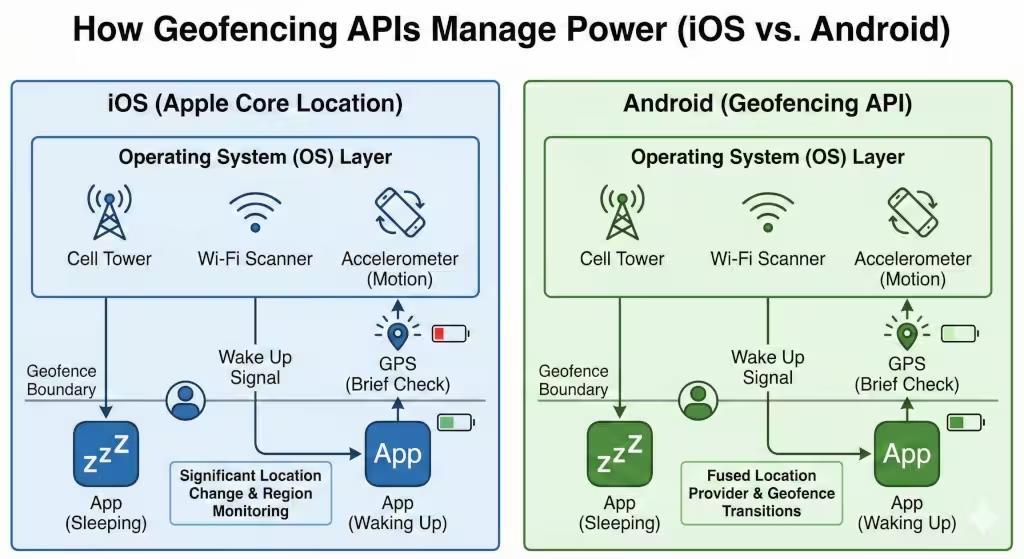
This is where the magic happens. If geofencing apps ran in the background constantly checking “Are we there yet? Are we there yet?” your phone would die in two hours.
Instead, modern operating systems use a “Wake Up” mechanism.
The “Wake Up” Call
When you install an app like Life360 or a Smart Home automation app, it registers a “fence” with the Operating System (iOS or Android). The app then goes to sleep. It stops running. It stops using the CPU.
The Operating System takes over. It uses low-power methods (like Cell Towers) to watch your location. Only when you cross the invisible boundary does the OS “wake up” the app and say, “Hey, the user just entered the Home Zone. Do your thing.”
Significant Location Change Service (SLCS)
This is Apple’s secret weapon for battery life. Instead of tracking you meter-by-meter, SLCS only alerts the phone when you move a “significant” distance (usually 500 meters or more) or switch to a new cell tower.6 This allows the heavy GPS hardware to stay powered down for hours at a time.
Stop Detection
Your phone is smarter than you think. It uses the accelerometer (the sensor that detects motion) to know if you are moving.
-
Scenario: You are sitting at your desk for 4 hours.
-
Result: The accelerometer tells the location services, “He hasn’t moved. Stop checking for GPS signals.”
-
Benefit: This drastically reduces geofencing drain because the system isn’t wasting energy trying to locate a stationary object.
Factors That Exacerbate Battery Drain
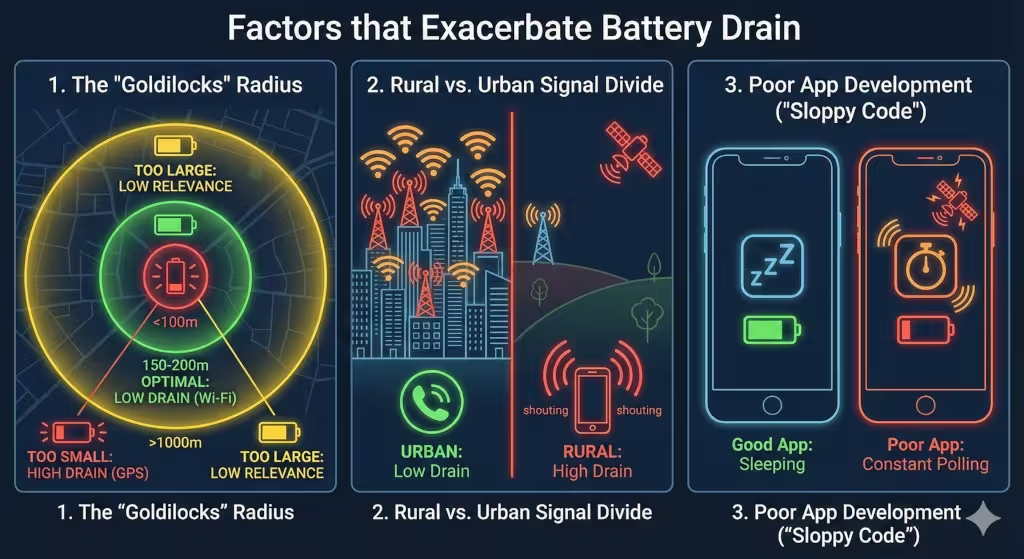
So, if the tech is so smart, why do some users still see 20% drops in battery life? Usually, it comes down to three variables: Radius, Signal, and Code.
1. The “Goldilocks” Radius
The size of the geofence matters.
-
Too Small (< 100 meters): If a developer sets a tiny geofence (like just your front door), the phone has to be extremely precise to know if you are inside or outside. It forces the phone to use GPS, which kills the battery.
-
Too Large (> 1000 meters): You lose relevance. You don’t want the lights turning on when you are still 5 miles away.
-
Optimal (150 – 200 meters): This allows the phone to use Wi-Fi triangulation, which is accurate enough and battery-friendly.
2. The Rural vs. Urban Signal Divide
Geofencing drains more battery in rural areas than in cities.
-
In the City: There are thousands of Wi-Fi routers and cell towers. Your phone can find itself easily and quickly.
-
In the Country: Your phone has to “shout” louder to reach distant cell towers. If it can’t find Wi-Fi signals to triangulate, it might panic and switch to GPS, draining power faster.
3. Poor App Development (The “Sloppy Code” Factor)
This is the most common culprit. A well-made app registers the geofence and goes to sleep. A poorly made app might keep a “background process” running that queries the GPS every 10 seconds.
-
Red Flag: If an app asks for “High Accuracy” location constantly, it is likely poorly optimized.
Data Analysis: Geofencing vs. GPS Navigation
Let’s look at the numbers. It is important to distinguish between Active usage and Passive usage.
| Feature | Technology Used | Estimated Battery Impact (Per Hour) |
| GPS Navigation (Google Maps) | Active GPS + Screen On + Data | High (15% – 20%) |
| Poorly Coded Geofencer | Background GPS (Constant) | Medium (5% – 10%) |
| Life360 / Location Sharing | Mixed (GPS + Motion Sensors) | Low-Medium (2% – 5%) |
| Optimized Geofencing (Retail/Home) | Wi-Fi + Cell ID (Passive) | Very Low (< 1%) |
The Takeaway: A standard geofencing app that is just waiting for you to enter a zone should consume less than 3% of your battery over an entire day. If it is using more, something is wrong.
Mitigation Strategies (How to Save Battery)
Whether you are a user trying to survive the day or a developer trying to retain users, here are the fixes.
For Users: Settings to Check
-
Keep Wi-Fi ON: Even if you aren’t connecting to a network, keep Wi-Fi enabled. It allows your phone to “see” where it is without turning on the power-hungry GPS chip.
-
Audit “Always Allow”:
-
iOS: Go to Settings > Privacy > Location Services. Look for apps set to “Always.”
-
The Rule: Only Geofencing apps (Smart Home, Life360) need “Always.” Retail apps (Starbucks, Target) usually work fine with “While Using” or can be switched off if you don’t care about location-based coupons.
-
-
Background App Refresh: Turning this off for a geofencing app might break it, but turning it off for other apps can save the battery overhead needed to run the location checks.
For Business Owners & Developers
-
Implement “Dwell Time”: Do not trigger an alert the second a user enters the circle. Wait until they have been there for 2 minutes. This prevents “flickering”—where a user driving past a store triggers the GPS, then exits immediately, wasting data and power.
-
Batch Your Requests: Do not send data to the server every second. Collect the location data and send it in a single “packet” every 5 minutes. This keeps the cellular radio (a big battery drainer) asleep longer.
Questions about Battery Life and Geofencing
Q: How much battery does Life360 use compared to other apps?
Life360 uses more battery than a standard geofencing app because it is doing more than just location. It creates a “Drive Detection” profile, which monitors your speed and sudden stops. This requires the accelerometer and gyroscope to be active, alongside the GPS. Expect about 10-15% drain over a full day, compared to 1-2% for a simple smart home geofence.
Q: Does turning off location services save battery?
Yes, absolutely. But you are turning your smartphone into a “dumb phone.” You lose “Find My iPhone,” localized weather, and navigation. A better middle ground is to disable location for specific apps that don’t need it (like Games or Social Media) while leaving it on for Maps and Safety.
Q: Why is the location icon always on in my status bar?
On iPhones, look closely at the icon.
-
Solid Purple/White Arrow: An app is using Active GPS. This is draining battery now.
-
Hollow Outline Arrow: An app is using Geofencing.7 It is monitoring a region but is not actively tracking you. This is low drain.
Conclusion
So, does geofencing drain phone battery? Technically, yes. Anything that asks your phone to think drains battery.
But in 2025, the drain is rarely the fault of the technology itself. It is usually the result of poor implementation, weak cellular signals, or user error (like forcing GPS when Wi-Fi would do).
For the average user, the utility of geofencing, having your house warm up before you walk in the door, or knowing your child arrived safely at school, adds immense value that outweighs the 2% or 3% daily battery cost. It is a “sipping” technology, not a “gulping” one.
If you are seeing massive drain, check your settings, keep your Wi-Fi on, and ensure you aren’t using ten different tracking apps simultaneously.