The era of relying solely on a metal key or a plastic badge is over. In the world of modern security, location is the new credential. If you are still securing your business assets based only on who someone is, without asking where they are, you are leaving a massive gap in your armor. This is where geofencing comes in.
So, what is geofencing for access control? In its simplest form, it is a virtual perimeter for real geographic areas. When a device enters or leaves this invisible zone, it triggers a specific action in your security system. It changes the rules of entry based on location.
The shift to this technology is not just a trend. It is a necessary evolution. We call this the “Zero Trust” model. It means we trust no one until we verify both their identity and their location. Whether you are running a small construction site or a large hospital, understanding this technology is the key to locking down your future.
The Architecture: How Geofencing Access Control Works
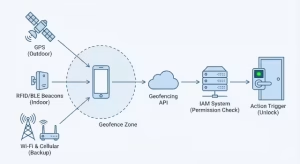
To understand how we build these systems, you need to look at the three main technologies we use. We do not just guess where a person is. We use precise data to triangle their position. A robust access control system relies on a “triad” of signals. We use different tools for different jobs because the physical world is messy. Walls block signals, and batteries die. A good access control architect knows how to mix these three tools to create a seamless safety net.
1. GPS (Global Positioning System)
This is the satellite system you use in your car. It is the heavy lifter for outdoor access control. GPS works by listening to signals from satellites orbiting the earth. For an access control system, this is very useful for large areas. For example, if a delivery truck gets within one mile of a warehouse, the GPS tells the main gate to open. This is efficient because the driver does not have to stop and punch in a code.
However, GPS has limits. It struggles indoors because satellite signals cannot easily pass through thick concrete walls or steel roofs. If you rely only on GPS for your access control inside a building, you will fail. The signal will bounce around, and the system will not know if you are in the lobby or the parking lot. That is why we only use GPS for the “outer shell” of our security.
2. RFID and Bluetooth Beacons
This is the standard for indoor security. Since GPS fails inside, we need a different way to track location for access control. We place small sensors, called beacons, on walls. These beacons send out a “ping” using Bluetooth Low Energy (BLE). Think of them like little lighthouses.
When a user’s phone or smart badge picks up this ping, the system knows exactly which room they are in. This is how we secure server rooms or pharmacy storage closets. The access control reader sees the phone, checks the beacon signal, and knows that the user is standing right in front of the door. This allows for very specific control. We can let someone into the hallway but keep the office door locked, all based on these small signals.
3. Wi-Fi and Cellular Triangulation
If the GPS fails and there are no beacons, we use Wi-Fi networks and cell towers as a backup. By measuring how strong the signal is from three different towers, we can guess the user’s location. It is less precise than the other methods. It might only know you are in the building, not which room you are in.
However, it works well as a safety net for your access control strategy. If a phone goes dark on GPS, the cellular network can still verify the general location. This ensures that the access control system never loses track of a user completely. It is about having layers of protection.
The Logic Flow
The computer logic is simple but powerful. It follows a strict set of rules. Here is what happens in milliseconds when a user tries to enter a secure zone managed by access control:
-
Step 1: The user’s device enters the virtual zone we call
Geofence_ID_Alpha. -
Step 2: The device sends a signal to the API (the software bridge). The signal says, “I have entered the zone.”
-
Step 3: The Identity and Access Management (IAM) system checks the user’s permission level.5 It asks, “Is this person allowed in
ID_Alpha?” -
Step 4: If the answer is yes, the Action Trigger fires. The smart lock disengages, or the secure computer file unlocks.
This entire process happens faster than you can blink. It creates a feeling of magic, but it is just math and geography working together to improve your access control.
State of the Art: 2025 Trends in Geofenced Security
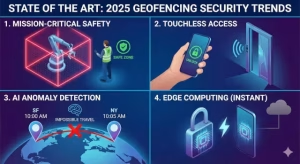
The technology changes fast. What worked five years ago is now obsolete. In 2025, we are seeing new trends that make access control smarter and safer. The focus is shifting from simple convenience to absolute safety and intelligence.
Mission-Critical Geofencing
In the past, geofencing was mostly for marketing. Stores used it to send coupons when you walked by. Now, we use it for life and safety. We call this “Mission-Critical” usage. This is where access control saves lives.
For example, in a large factory, there might be dangerous robots or heavy crushers. We can set a geofence around a dangerous robot arm. The workers wear tags that talk to the access control system. If a human worker enters that danger zone without authorization, the access control system cuts power to the robot immediately. This prevents accidents before they happen. It is not just about locking doors; it is about controlling the environment to keep people safe.
The “Touchless” Era
Nobody wants to touch a dirty keypad anymore. The trend in 2025 is completely touchless access control. Your phone is your key. Because of geofencing, you do not even need to take your phone out of your pocket.
The door detects that your phone is two feet away and inside the “unlock zone.” The access control system verifies you are who you say you are, and the door swings open automatically. This is hygienic and efficient. It speeds up movement through a building. Imagine thousands of employees entering a headquarters in the morning. With touchless access control, there are no lines at the turnstiles. They just walk through.
AI and Anomaly Detection
Artificial Intelligence is now watching the map. It looks for “impossible travel.” This is a major boost for access control security.
Here is an example: imagine a user logs into the company network from an office in California. Five minutes later, the same user ID tries to open a door in Texas. That is physically impossible. A human guard might miss this detail, but the AI spots this error instantly.
The AI knows the location data does not match the travel time. It will lock out the user and alert the security team. It assumes the credential has been stolen. This is a massive leap forward for access control integrity. It adds a brain to the system that never sleeps and never blinks.
Edge Computing
Speed matters. If you walk up to a door, you do not want to wait ten seconds for it to unlock. To fix this, we are moving to “Edge Computing.”
In the old days, the lock would send a signal to a cloud server, the server would think about it, and send a signal back. That takes time. “Edge” means the calculation of your location happens right on your phone or on the door lock itself. The access control decision is made locally. This reduces lag. It also saves battery life because the device does not have to talk to the internet constantly. It makes the access control feels instant and snappy.
Sector-Specific Use Cases
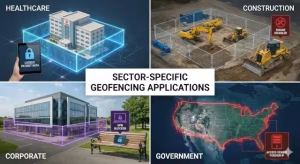
Different industries use geofencing for access control in very different ways. I have seen this technology save money and protect data across many fields. It is versatile. The way a hospital uses it is different from a construction site, but the core goal is the same: control who has access to what.
Healthcare and HIPAA Compliance
Hospitals have strict rules about patient privacy. They have to follow laws like HIPAA. We use geofencing to protect Electronic Medical Records (EMR).
We can set a rule in the access control software that says a doctor can only access patient files when they are physically inside the hospital building. If they take their tablet to a coffee shop across the street, the access control system detects the location change. It effectively “bricks” or locks the access to the files.
The doctor can use the tablet to check email or browse the web, but the patient data remains locked until they return to the secure zone. This prevents sensitive data from being stolen on public Wi-Fi. It turns the hospital walls into a digital vault.
Construction and Logistics
On a job site, theft is a major problem. Heavy equipment like bulldozers and cranes cost a lot of money. We use geofencing to lock this equipment.
A bulldozer can be programmed to only start if it is inside the yellow lines of the construction site. If someone tries to steal it and drive it away, the engine cuts off as soon as it crosses the geofence line. This is the ultimate form of asset access control. It renders the stolen item useless.
Also, it helps with payroll. Workers do not need to punch a time card. The access control system logs them in when they drive onto the site and logs them out when they leave. This creates accurate data for billing and prevents time theft.
Corporate Security
Corporations worry about “Data Containment.” Companies have secret codes, financial records, and documents they do not want leaking out. We can set up a geofence around the headquarters.
The corporate Wi-Fi and VPN access control lists can be set to only accept connections from inside that fence. This prevents hackers from sitting in a parking lot nearby and trying to break into the network. If you are not physically inside the building, you do not exist to the network. This access control method makes the perimeter very hard to breach.
Government and Defense
For government clients, we use geofencing to block foreign threats. This is access control on a global scale.
We can create a geofence that covers the entire country. If an IP address tries to access a government server from a country that is on a blacklist, the access control system rejects it immediately. This reduces the “attack surface,” or the number of places a hacker can attack from. It ensures that only people within the borders can even attempt to log in.
Technical Implementation and Optimization
If you want to install this, you need to know how to tune the engine. You cannot just turn it on and hope for the best. There are specific settings that make an access control system reliable. As an expert, I see many businesses fail because they skip these technical details.
Battery Optimization
One of the biggest complaints is that tracking drains the battery. If your employees’ phones die by noon, your access control system fails. To fix this, we do not use constant GPS tracking.
Instead, we use a software feature called “Significant Location Change.” The phone only wakes up and checks its position if it moves a significant distance. It rests when the person is sitting at their desk. This saves power.
Also, we set the radius of the geofence to be larger than 100 meters. If the zone is too small, the GPS signal might jump in and out due to signal bounce. We call this “flickering.” It causes the door to lock and unlock rapidly, which drains the battery and annoys the user. A smooth access control system is one that balances accuracy with battery life.
Handling “Dwell Time”
Sometimes, you do not want the door to unlock just because someone walks past it. You only want it to open if they stand there for a moment. This is called “Dwell Time.”
We configure the access control logic to wait. The user must be inside the zone for at least five seconds before the system triggers the unlock action. This prevents accidental unlocks when a guard walks by a secure door on patrol. It adds “intent” to the system. The access control system learns to tell the difference between someone passing by and someone trying to enter.
API Integration
To build this, you need to connect your software. We use tools like the Google Geofencing API or Android Location Services. These tools provide the raw data.
Your developer writes the code that listens for the “ENTER” or “EXIT” events. When the API says “ENTER,” your access control software runs the credential check. It is important to have clean code here. If the API lags, the person stands at the door waiting. Good access control must be seamless. We test these APIs under stress to make sure they work even when the network is busy.
The “Elephant in the Room”: Privacy and Challenges
We must be honest about the downsides. Geofencing is powerful, but it scares some people. They worry about being watched. An access control expert must also be a privacy advocate. If people do not trust the system, they will find ways to cheat it.
Surveillance vs. Security
Employees often ask, “Does this track me when I am at home?” The answer should be no. A good access control system only listens for the specific geofence at work. It does not record where you go on the weekend or what you do in the evening.
However, the fear is real. Companies must be transparent. They must explain that the system is for access control, not for spying on personal lives. The best practice is to have the app show a notification when it is active. This builds trust. When employees know the access control stops working when they leave the lot, they feel better about installing the app.
GDPR and CCPA Compliance
There are laws about data privacy. In Europe (GDPR) and California (CCPA), you cannot track someone without their permission. The system must be “Opt-In.”
The user must agree to turn on location services for the access control app. If they say no, the system will not work, and they might have to use a physical badge. Companies must also mask the data. This means that the database should not store “John Smith was here.” It should store a random ID number that is only linked to John Smith if there is a security breach. This protects user privacy while maintaining strict access control.
Spoofing and Fake Locations
Hackers are smart. They can use software to tell their phone to lie about its location. This is called “GPS Spoofing.” They can be in Russia but make their phone say it is in New York.
To fight this, we use “Multi-Factor Authentication” (MFA). The system checks the location, but it also asks for a fingerprint or a face scan. It is much harder to fake both a location and a face at the same time. We also use software that detects if the GPS signal looks “too perfect.” Real GPS signals wobble a little bit. A fake signal is often perfectly still. Our access control software looks for these signs to catch cheaters.
Why Physical Keys Are Obsolete
Let us talk about why the old ways are dying. Physical keys have been used for thousands of years, but they have a fatal flaw. If you lose a key, you have to change the lock.
If an employee quits and takes their key with them, you have a security breach. You have to call a locksmith. This is expensive and slow. With digital access control, you just click a button. You remove the user from the list, and their digital key is gone instantly.
Also, physical keys do not leave a record. You do not know who opened the door or when. With geofencing access control, you have a perfect log. You can see exactly who entered the building at 9:00 AM. This data is valuable for managers. It helps them understand how their building is used.
The Cost Benefit Analysis
Some business owners worry that this technology is expensive. They look at the price of the software and hesitate. But you have to look at the long term.
Think about the cost of a security guard. You have to pay them a salary, benefits, and insurance. An automated access control system works 24/7 without a break. It is cheaper in the long run.
Also, think about the cost of a data breach. If someone steals your customer list, it could cost you millions in lawsuits. Investing in robust access control is like buying insurance. It protects your most valuable assets. When you compare the cost of the software to the cost of losing a bulldozer or a hard drive full of data, the choice is simple.
Integration with Other Systems
Geofencing access control does not work alone. It works best when it talks to your other systems.
For example, it can talk to your lighting and heating system. When the first employee enters the geofence in the morning, the access control system tells the lights to turn on and the AC to cool down. When the last person leaves, it turns everything off. This saves money on electricity.
It can also talk to your HR software. If an employee calls in sick but their badge enters the building, the system flags the error. It creates a connected ecosystem where every part of the building is aware of the people inside it.
How to Choose the Right Vendor
Not all access control companies are the same. When you are looking for a partner, you need to ask hard questions.
Ask them about their “uptime.” This means how often their system is working. You want a number like 99.9%. If their servers go down, your doors might not open.
Ask them about their support. If the system breaks at 2:00 AM, will someone answer the phone? Access control is a 24-hour job.14 You need a partner who understands that.
And finally, ask them about their map data. Geofencing relies on good maps. If their maps are outdated, your fences will be in the wrong place. You need a vendor that uses high-quality, up-to-date satellite imagery.
Detailed Example: The Smart Office
Let me paint a picture of what a fully integrated system looks like.
Imagine you work at a modern tech company. You drive to work. As your car enters the parking lot, the gate reads your license plate and opens. This is the first layer of access control.
You park your car and walk to the lobby. Your phone connects to the lobby Wi-Fi. The system knows you are in the building. The elevator is called automatically for you.
You walk to your office door. You do not reach for a key. The Bluetooth beacon above the door senses your phone. The light turns green, and the door clicks open.
You sit at your desk and open your laptop. The laptop checks your location. It sees you are in the “Secure Zone.” It connects to the company server and downloads your email.
At lunch, you leave the building. As soon as you cross the street, your laptop disconnects from the server. If you left it on your desk, nobody can use it to access sensitive files because the user (you) is not there.
This is the seamless reality of modern access control. It is not science fiction; it is happening right now.
Frequently Asked Questions about Access Control
I hear these questions often when I consult for small businesses. It is normal to have questions when adopting new technology.
Does geofencing track your location when you are off the clock?
Generally, no. A properly configured access control app only wakes up when it touches the specific work geofence. It does not record your path to the grocery store. The operating system on your phone (like iOS or Android) prevents apps from tracking you constantly without your knowledge.
How accurate is geofencing for indoor access control?
GPS is not accurate indoors.15 It can be off by 50 feet. If you rely on it, a door might open when you are still in the hallway. For indoors, you must use Bluetooth beacons. With beacons, the accuracy is very high, sometimes down to a few inches. This allows for very precise control.
Can geofencing replace physical keycards entirely?
It can, but it is risky to have zero backup. If the internet goes down or a phone battery dies, you still need a way in. Most secure facilities use geofencing as the primary method but keep a few physical keys or cards for emergencies. We call this “redundancy.” Good access control always has a Plan B.
What is the difference between geofencing and beacons?
Geofencing usually refers to the GPS circle on a map (outdoor). Beacons are hardware boxes you stick on a wall that talk to phones (indoor). Both are used for access control, but in different environments. Think of geofencing as the gate to the property, and beacons as the key to the specific door.
Is it hard to set up?
It depends on the size of your business. For a small office, you can set it up in an afternoon. You draw the fence on a map on your computer, invite users via email, and you are done. For a large factory, it takes more planning. You have to test the signals and place beacons in the right spots. But compared to re-keying every lock in a building, it is much easier.
Conclusion
Geofencing is the meeting point of the physical world and the digital world. It allows us to build an access control system that is fluid, intelligent, and reactive. We are no longer guarding static doors; we are guarding dynamic zones.
We have covered the tech, the trends, and the challenges. We have looked at how GPS, beacons, and Wi-Fi work together to verify location. We have discussed how this protects data in hospitals and equipment on construction sites.
For the reader, the path forward is clear. You must audit your current security. Ask yourself: does my security system know where I am? If the answer is no, it is time to upgrade. The technology is here, the trends for 2025 are set, and the value of securing your assets with location data is undeniable.
Do not wait for a security breach to happen. Access control is about being proactive. It is about setting the rules before the game starts. By using geofencing, you are taking control of your environment. You are making sure that the right people are in the right place at the right time. That is the definition of security.