The days of accountants sitting in dim rooms with green eye shades, staring at endless rows of numbers on paper, are over. In the past, finding a mistake in a financial report was like trying to find a needle in a haystack. People are not perfect. We get tired, we get bored, and we make simple mistakes. These are called transposition errors, like writing 56 when you meant 65. Sometimes data is old or “stale,” and sometimes we only check a small sample of the data because there is just too much to look at. This creates a “Human Error Gap” that can cost businesses millions of dollars.
Today, we are seeing a major shift. Companies are moving away from “reactive” checking, which means looking for mistakes at the end of the month when it might be too late. Instead, they are using automated systems that work 24/7. These systems act like a digital immune system for a company’s money. Just like your body fights off a cold before you even feel sick, these systems find and fix financial mistakes before they become a big problem.
This article will show you exactly how automated systems detect errors in financial reports using AI to keep business data honest and accurate.
The Mechanics: How Automated Systems Detect Errors in Financial Reports Using AI
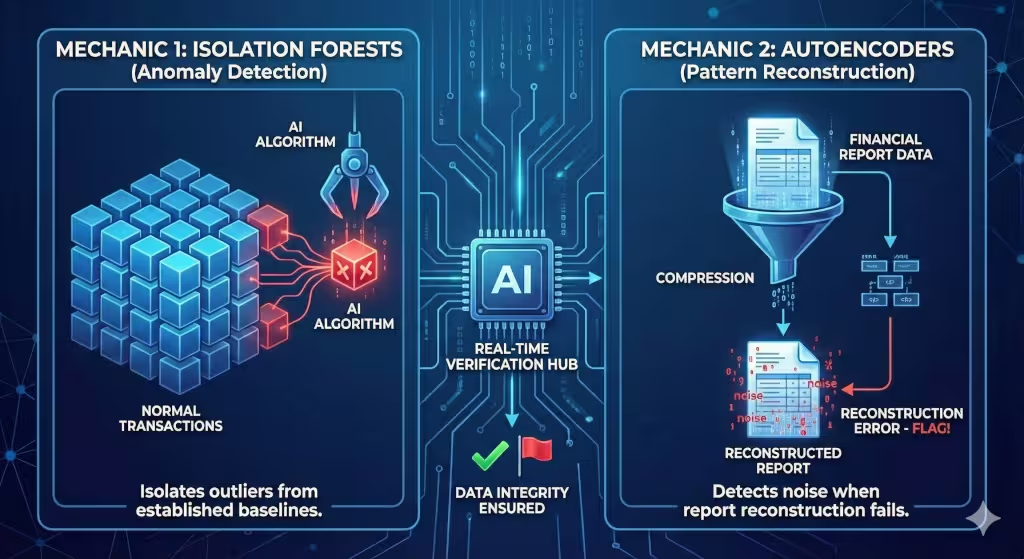
Understanding the “how” behind these automated systems is what separates a business owner who just buys software from one who actually understands their data integrity. To explain the mechanics properly, we have to look at the specific mathematical and logical steps the AI takes to protect your balance sheet.
When automated systems analyze your financial reports, they don’t just “look” at numbers; they process them through several distinct layers of logic.
1. Isolation Forests: Finding the “Loners”
In data science, an Isolation Forest is a way to find anomalies. Most financial transactions follow a pattern—they are “bunched up” together in terms of amount, date, and vendor. Automated systems use this logic to isolate data points that are “far away” from the rest.
-
Example: If you pay your rent on the 1st of every month for $2,000, and suddenly a $2,000 payment appears on the 15th, or a $20,000 payment appears on the 1st, the automated systems “branch off” that specific transaction because it is easy to isolate from the “forest” of normal data.
2. Autoencoders: The Digital Photocopy Test
This is a more advanced part of how automated systems detect errors. An autoencoder is a type of neural network that tries to “compress” a financial report and then “reconstruct” it perfectly.
-
If the automated systems can easily reconstruct the data, it means the data follows the usual rules.
-
If the automated systems struggle to reconstruct a specific line item, it means that line item contains a “noise” or an error that doesn’t fit the pattern. This “reconstruction error” is a massive red flag for auditors.
3. Fuzzy Logic for Duplicate Detection
Standard automated systems might miss a duplicate if one invoice says “WebHeads United” and another says “WebHeads Utd.” However, AI-driven automated systems use “Fuzzy Logic.” This allows the computer to understand that these two strings of text are likely the same entity. By calculating a “similarity score,” the automated systems can catch duplicate payments that would slip past a human eye or a basic spreadsheet filter.
The Workflow of Detection
To make this flow easily, think of it as a three-stage filter that all your data must pass through:
| Stage | What Happens | Result |
| Ingestion | Automated systems pull data from your bank, credit cards, and invoices. | All data is “centralized” and cleaned. |
| Pattern Matching | The AI compares current transactions against 24+ months of history. | “Normal” behavior is confirmed; “weird” behavior is flagged. |
| Cross-Verification | Automated systems check the “words” (contracts) against the “numbers” (ledger). | Ensures that what you agreed to pay matches what you actually paid. |
Why This Matters for Your Small Business
When these automated systems find an error, they don’t just delete it. They create a “digital breadcrumb trail” known as an audit trail. This means if the IRS or a bank asks why a number was changed, the automated systems can show exactly why the error was flagged and who approved the fix. This level of data integrity is what builds a “competent” and “innovative” business.
By using automated systems in this way, you aren’t just catching typos; you are using the same high-level math used by MIT or Harvard researchers to protect your local business’s cash flow.
Key Technologies and Specific Entities
When we talk about automated systems, we are talking about a team of different technologies working together. One important member of the team is Robotic Process Automation, or RPA. RPA is like a digital robot that handles the “last mile” of work. It moves data from one computer program to another so that humans don’t have to copy and paste. When RPA works with AI, you get “Intelligent” automated systems.
Another trick these automated systems use is a math rule called Benford’s Law. This rule says that in many lists of numbers, the number 1 appears as the first digit much more often than the number 9. If a person is trying to fake numbers in a report, they usually don’t follow this rule. Automated systems can run a Benford’s Law test in seconds to see if the numbers look “man-made” rather than natural.
There is also something called iXBRL. This is a special way of tagging financial data so that it can be read by both people and machines. Automated systems use these tags to make sure every report sent to the government is perfect. Many famous companies like SAP, Oracle, and Xledger are building these automated systems right now. These tools are becoming the gold standard for how businesses stay organized and honest.
Common Questions About AI in Finance
Many people wonder if automated systems can catch 100% of financial errors. The truth is that while automated systems are much better than humans, they still need a little help. In the old days, auditors would only check a “sample” or a small piece of the data. Now, automated systems check every single transaction. This gets us very close to 100% accuracy, but we still like to have a human expert double-check the work of the automated systems.
Another common question is about the risks. Can automated systems make mistakes? Sometimes, an AI can “hallucinate,” which means it thinks it sees a pattern that isn’t really there. Also, if the data you put into the automated systems is messy, the results will be messy too. This is why data integrity is so important.
People also ask how automated systems help with big rules like GAAP or IFRS. These are sets of rules that all accountants have to follow. Automated systems are programmed with these rules. If a rule changes, the software is updated, and the automated systems immediately start checking for the new rules across the whole company. This makes staying compliant much easier for small businesses.
Implementation Strategy for Small Businesses
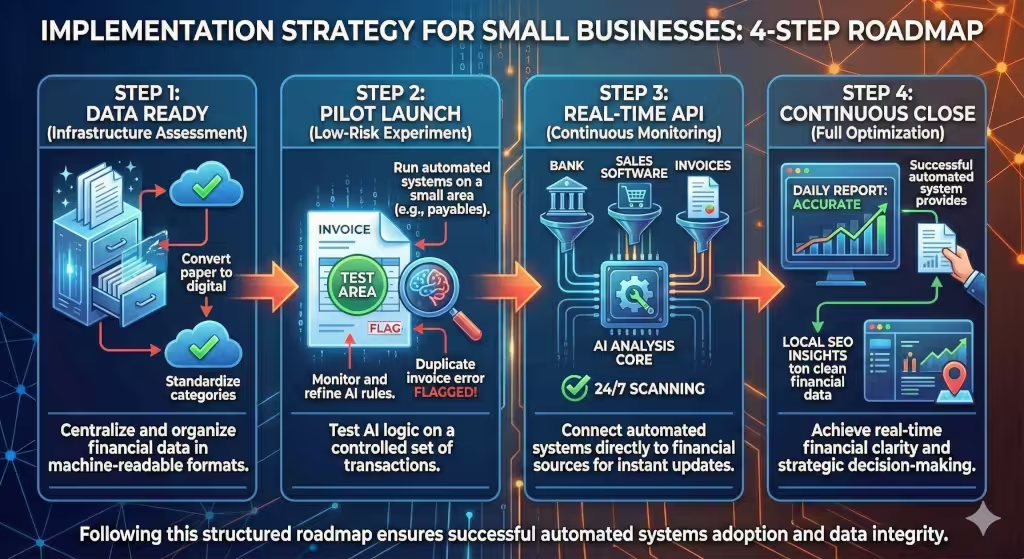
You might think that automated systems are only for giant companies, but that is not true anymore. Small businesses can use these tools too. The first step is Data Structuring. This means you need to stop keeping your records on paper or in messy PDF files. Automated systems work best when data is in a clean format, like a spreadsheet or a database.
Next, a small business should start with a “Pilot” program. This means you pick one small area, like travel expenses or bank records, and let the automated systems handle that first. Once you see how well the automated systems work there, you can move on to bigger things.
The final step is “Real-Time Integration.” This is when you connect your automated systems directly to your bank and your sales software. This creates what we call a “Continuous Close.” Instead of waiting until the end of the month to see if you made money, the systems tell you exactly where you stand every single minute of the day.
For more information, look at the checklist at the end of the article.
Technical and Business Terms to Know
When you are learning about how automated systems work, you will hear a lot of big words. Let’s break them down simply.
-
Feature Extraction: This is how automated systems pick out the most important parts of a bill, like the date or the total amount.
-
Neural Networks: This is a type of AI that mimics how a human brain works to help automated systems learn from their mistakes.
-
Audit Trail: This is a digital map that automated systems create. It shows exactly where every dollar came from and where it went.
-
Revenue Leakage: This is what happens when a business loses money because of tiny errors. Automated systems stop this leakage by catching small mistakes that add up over time.
-
Internal Controls: These are the “guardrails” that a company puts in place. Automated systems make these guardrails much stronger.
The Value of Automated Accuracy
In the end, using automated systems is about more than just catching mistakes. It is about saving time and money. When these systems handle the boring work of checking numbers, the human workers can focus on big ideas. They can become “strategic advisors” who help the business grow, rather than just “data gatherers” who look for typos.
The return on investment for these systems is huge. You save money on labor, you avoid big fines from the government, and you have peace of mind knowing your data is correct. Automated systems provide a clear answer to the problem of human error. They are fast, they are accurate, and they are the future of business.
By using automated systems, your business becomes more than just a place that sells things. it becomes a high-tech operation that uses data to win. Whether you are a small shop or a growing startup, automated systems are the key to keeping your financial reports clean and your business successful.
Implementation Checklist for a Small Business
For a small business, transitioning to automated systems for financial oversight is a technical necessity to remain competitive and compliant.
If your data is disorganized, an AI will simply help you make mistakes faster. We call this “Garbage In, Garbage Out.” To avoid this, follow my structured implementation checklist below.
Phase 1: Infrastructure Assessment & Data Readiness
Before selecting a software vendor, you must ensure your underlying data architecture can support automated systems.
-
Audit Current Data Format: Convert all paper-based or manual ledger entries into machine-readable formats (CSV, XLSX, or direct database entries).
-
Centralize Financial Storage: Ensure all receipts, invoices, and bank statements are stored in a single cloud-based repository (e.g., SharePoint, Google Drive, or a dedicated ERP).
-
Establish Data Governance Rules: Define who has “Read” vs. “Write” access. Automated systems require high-quality, untampered data to build accurate baselines.
-
Standardize Chart of Accounts: Ensure your categorization of expenses is consistent across the last 24 months so the AI can recognize historical patterns.
Phase 2: Selection of Automated Systems
Choose a tool that fits your technical overhead. Do not over-buy features you lack the staff to manage.
-
Evaluate Integration Capabilities: Does the tool connect via API to your existing bank accounts and point-of-sale (POS) systems?
-
Verify Security Standards: Ensure the vendor is SOC2 compliant and offers end-to-end encryption. Data integrity is worthless if the data is stolen.
-
Identify “Out-of-the-Box” Algorithms: Look for automated systems that already include Benford’s Law tests and duplicate invoice detection without requiring custom coding.
-
Scalability Check: Ensure the system can handle a 50% increase in transaction volume without a significant jump in subscription costs.
Phase 3: Pilot Program & Calibration
Never “flip the switch” on your entire accounting department at once. Start with a controlled experiment.
-
Select a Pilot Category: Use accounts payable or employee travel expenses as your testing ground. These areas often have the highest frequency of small errors.
-
Run Parallel Systems: For 30 to 60 days, perform your manual reconciliation alongside the automated systems.
-
Measure False Positives: If the system flags 100 transactions but only 2 are actual errors, the sensitivity needs to be turned down.
-
Establish a “Human-in-the-Loop” (HITL) Protocol: Designate one person (likely your lead accountant or yourself) to review and “approve” the AI’s findings to train the machine learning model.
Phase 4: Full Integration & Optimization
Once the pilot is successful, move the developed systems into your core financial reporting.
-
Set Up Real-Time Alerts: Configure the system to send immediate notifications for “high-materiality” errors (e.g., any discrepancy over $1,000).
-
Automate Compliance Reporting: Link the output of your automated systems to your tax preparation software to streamline year-end filings.
-
Quarterly Model Review: Every three months, verify that the systems are still aligned with current tax laws and company growth.
-
Local SEO & Business Reporting: (From my perspective at WebHeads United) Use the clean data from your systems to track which local marketing efforts are actually driving profit, not just “vanity metrics.”
Pro-Tip: Implementation is 20% software and 80% discipline. If you do not maintain the integrity of the data you feed these automated systems, the insights provided will be mathematically sound but practically useless.