We are not in the old days of simple software anymore. In 2026, if you are a small business owner, you are likely feeling the heat to keep up. The big secret to staying ahead is knowing how to use AI for workflow automation in small business. It is not just about using a chatbot to answer a few customer emails. We are talking about building what we call agentic workflows. This means instead of you telling a computer every single step to take, you give it a goal, and the AI figures out the best path to get there. It is the difference between a tool and a teammate.
By moving toward autonomous operations, you stop doing the boring, repetitive data entry and start focusing on the big ideas that actually grow your revenue.
The 2026 Automation Paradigm
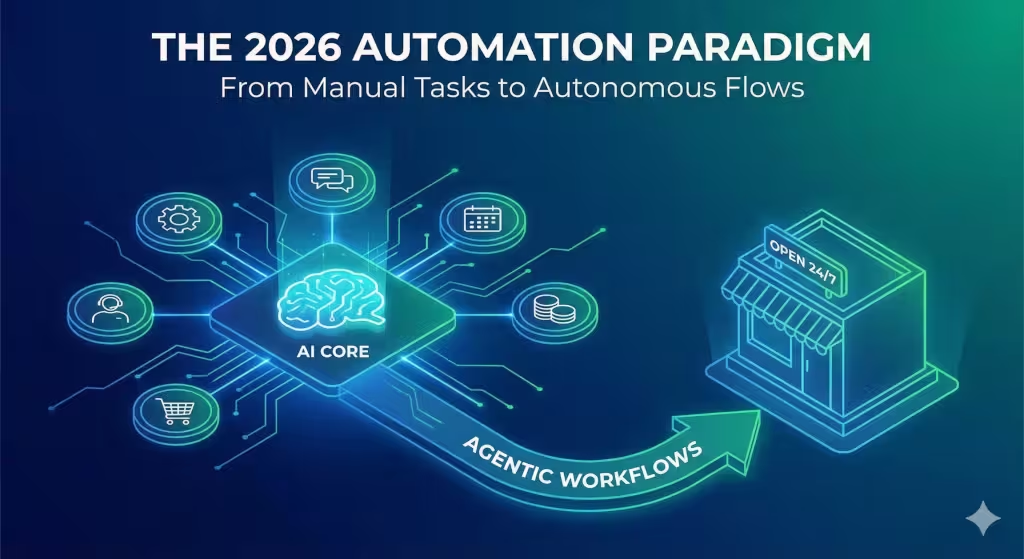
The world of business has changed fast. Just a couple of years ago, automation was something only the giant tech companies could afford. Now, the tools are so easy to use that even a local coffee shop or a small plumbing business can use them. When we talk about workflow automation, we are talking about creating a system where tasks happen on their own without you needing to click a button every time.3
In the past, you might have used a simple rule like, “If a customer fills out this form, send them an email.” That was great for its time, but it was rigid. If the customer asked a question that was not in your script, the system broke.
Today, workflow automation is much smarter. It uses artificial intelligence to understand the context. If a customer sends an email saying they are unhappy, the AI can sense that emotion and flag it for you immediately, or even offer a discount code right away based on the rules you set. This is what we call moving to autonomous operations. You are building a business that can “think” for itself in small ways, which frees up your brain for the hard stuff.
High-Impact Use Cases
If you are wondering where to start, you should look at the parts of your business that feel like a chore. Customer service is usually the first place people look. In 2026, you can set up AI agents that work 24/7. These are not those old, frustrating bots that never understood what you wanted. Modern AI agents can actually solve problems. They can look up an order status, change an appointment time, or explain a return policy. They triage the easy stuff so you only have to step in when a human touch is really needed.
Another big area is lead management and sales. Imagine a system that watches your website for “intent signals.” This means the AI notices when someone looks at your pricing page three times in one hour. Instead of you having to check your logs, the workflow automation kicks in. It sends a personalized follow-up email to that person, offering to answer any questions. It can even sync all this info to your CRM (Customer Relationship Management) system so your sales team knows exactly who to call.
Financial operations are also a huge win for small businesses. We all hate doing invoices and checking bank statements. With the right workflow automation, you can have AI reconcile your invoices. It looks at what you billed, compares it to what hit your bank account, and marks it as paid. It can even look at your past spending and predict if you will have enough cash next month. This kind of predictive power used to cost thousands of dollars, but now it is part of basic automation setups.
Finally, think about inventory. If you sell physical products, you know the pain of running out of stock. AI can look at your historical sales patterns and the time of year to tell you exactly when to order more. It can even draft the purchase order for you. This level of workflow automation keeps your shelves full and your customers happy without you having to stare at spreadsheets for hours.
The 2026 Edge: From Triggers to Agents
We are moving away from simple triggers. In the old days, we used “If This, Then That” logic. It worked, but it was limited. Now, we use something called agentic workflows. Think of an agent as a tiny digital employee that has a “chain of thought.” Instead of just following one step, it can think through a problem. For example, if you tell an AI agent to “help this customer with their late shipment,” it doesn’t just send one canned response. It checks the tracking number, sees there was a weather delay, writes a nice apology, and asks if they want a refund or a replacement.
Another cool thing in 2026 is the use of MCP (Model Context Protocol) servers. I know that sounds technical, but it just means your AI can safely talk to your own local business data. It connects the global power of an AI model with the specific facts about your business, like your specific pricing or your specific service area. This makes the workflow automation much more accurate because the AI actually knows who you are and what you do.
Even with all this tech, we still believe in “Human-in-the-Loop.” This means that for big decisions, like a large refund or a sensitive legal document, the workflow automation pauses and asks a human to double-check the work. This keeps things safe and ensures your business still has that personal touch people love.
Step-by-Step Implementation Guide
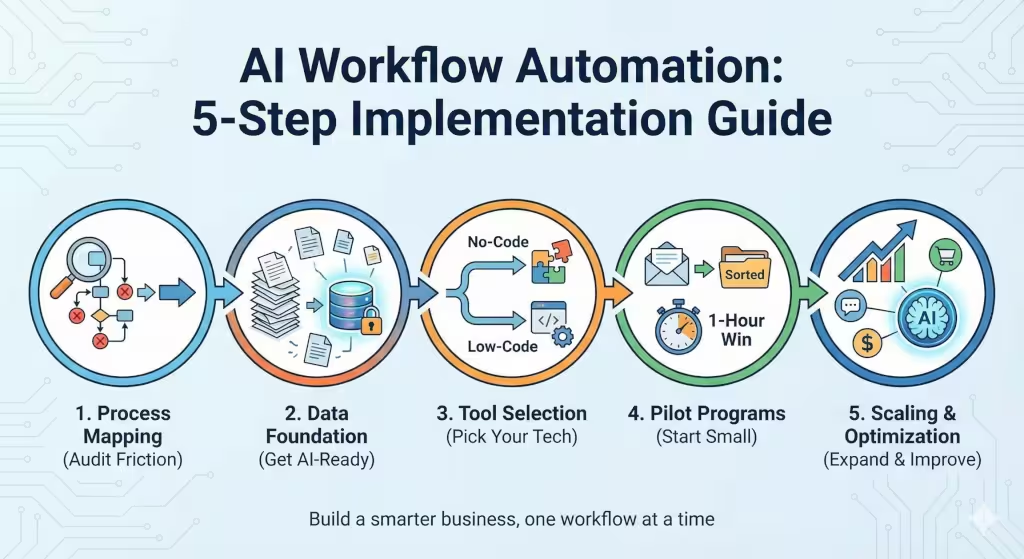
Starting with workflow automation does not have to be scary. You just need a plan.
1. Process Mapping
First, you need to find your “friction points.” These are the tasks you do every day that make you sigh. Are you copy-pasting names from an email into a spreadsheet? Are you manually sending out appointment reminders? If a task is repetitive, happens a lot, and does not require a Ph.D. to figure out, it is a perfect candidate for workflow automation.
2. Data Foundation
Before the AI can help you, it needs to know your data. You need to make sure your CRM and your documents are organized. AI is smart, but it cannot fix a mess. If your customer list is spread out over five different spreadsheets and three notebooks, you need to get them into one digital place first. This is called being “AI-ready.”
3. Tool Selection
You do not need to be a coder. There are “no-code” tools like Zapier or Make.com that let you connect different apps just by dragging and dropping. If you want something more advanced, there are “low-code” platforms. The key is to pick a tool that fits how much tech you want to handle. For most small businesses, no-code is the way to go.
4. Pilot Programs
Do not try to automate your whole business in one day. Start with a “1-Hour Win.” This is a small workflow automation that saves you just one hour a week. Maybe it is automatically sorting your emails or filing your digital receipts. Once you see that work, you will have the confidence to do more.
5. Scaling and Optimization
After your first few wins, look at the ROI (Return on Investment). If your customer service bot saved you 10 hours last month, that is 10 hours you spent making sales. Now you can look at cross-departmental flows, like connecting your marketing to your sales and then to your accounting.
Your Questions Answered about Workflow Automation
What is the easiest way to start with workflow automation?
The easiest way is to look at your email. Most small business owners spend too much time in their inbox. Use a tool to automatically save attachments to a folder or tag emails from important clients. This is a simple workflow automation that pays off immediately.
Will AI automation replace my small business employees?
In my experience, no. It usually just changes what they do. Instead of your assistant spending four hours a day on data entry, they can spend those four hours talking to customers and building relationships. We call this “augmentation.” The AI does the boring stuff so the humans can do the meaningful stuff.
What are the best low-cost AI tools for SMBs in 2026?
Tools like Zapier and Make.com are still the kings of connecting apps. For customer service, Intercom has great AI features. For managing your internal knowledge, Notion AI is fantastic. Most of these have free or low-cost plans for small businesses starting with workflow automation.
How do I ensure data privacy when using AI for workflows?
This is very important. You should always check the privacy settings of any tool you use. In 2026, most reputable tools have a “business mode” that promises they won’t use your private data to train their general AI models. Always look for these settings to keep your customer info safe.
The 2026 Tech Stack for SMBs
To make this easier to visualize, here is a table of the tools you might need.
| Category | Recommended Tools | Why Use It? |
| No-Code Integration | Zapier, Make.com | Connects your apps together without coding. |
| Agentic Platforms | n8n, Lindy.ai | Creates “agents” that can think through complex tasks. |
| Customer Experience | Intercom Fin, HubSpot AI | Automates chatting with customers and sales leads. |
| Knowledge Base | Notion AI, Glean | Helps you find information inside your own business fast. |
Understanding the Mechanics of Modern Automation
When we dig deeper into how workflow automation actually works, it comes down to data movement. Think of your business like a series of pipes. Information flows from a customer’s brain, into your website, through your email, and eventually into your bank account. Without workflow automation, you are the person standing at every junction with a bucket, manually moving the water from one pipe to the next. That is exhausting and slow.
By setting up these systems, you are basically building the plumbing. Once the pipes are connected, the information flows on its own. The “AI” part of this is like having a smart valve that knows which way the water should go based on what is in it. If the information is an invoice, the smart valve sends it to the accounting pipe. If it is a complaint, it sends it to the manager pipe. This level of workflow automation is what allows a small business to act like a big corporation without needing a hundred employees.
Why Local Businesses Need This Now
Respond to your Google My Business listing. Search engines like Google now look for how fast you respond to customers. If a customer messages you through your Google Business Profile and you don’t respond for six hours, you might drop in the rankings. But if you have workflow automation that instantly sends a helpful AI response, your “responsiveness score” stays high. This helps you show up at the top of local search results.
Also, people today have very little patience. They want answers now. If your competitor uses workflow automation to give an instant quote and you take two days, you lose the job every time. Using these tools is not just about saving time; it is about winning the race for the customer’s attention.
Overcoming the Fear of Technology
I know some people are worried that this is too complicated. They think they need a computer science degree from MIT to figure out how to use AI for workflow automation in small business. But the truth is, if you can use a smartphone, you can use these tools. Most of them use “Natural Language,” which means you just type in plain English what you want to happen. You can literally tell the software, “Whenever I get a new lead from Facebook, send them a text message and add them to my Google Sheet.” The software takes care of the rest.
The real challenge is not the tech; it is the mindset. You have to be willing to let go of the “old way” of doing things. You have to trust the system. Of course, you should check it regularly to make sure it is doing what you want, but once you see the power of workflow automation, you will never want to go back to manual work again.
The Financial Benefits of Efficiency
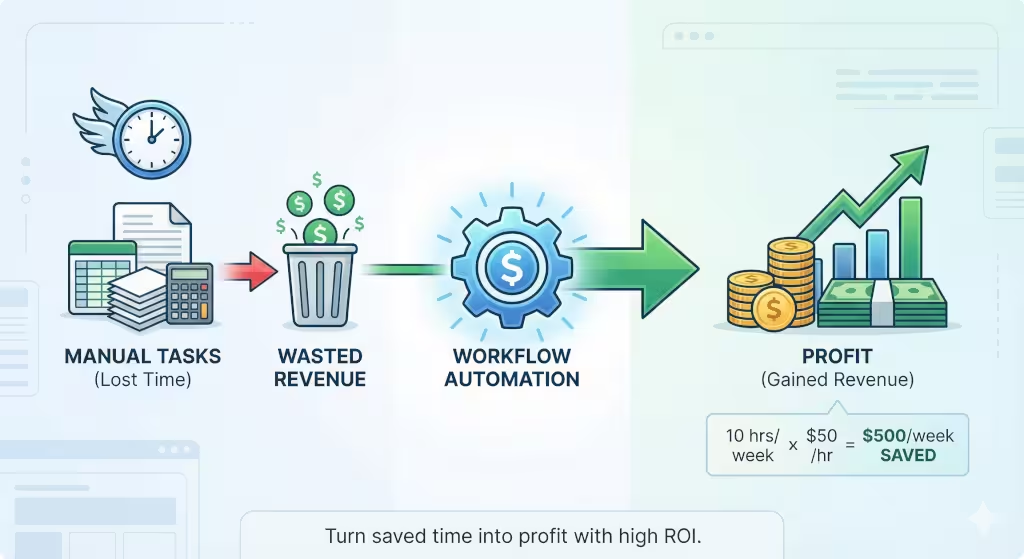
Let’s talk about the money. Every hour you spend on manual tasks is an hour you are not making money. If your time is worth $50 an hour and you spend 10 hours a week on admin, you are “spending” $500 a week on things a computer could do for free. Over a year, that is $26,000. For a small business, that is a huge amount of money.
Workflow automation turns that lost time back into profit. You can use that extra time to find new customers, create new products, or even just take a weekend off for once. The cost of the tools is usually very low, maybe $50 to $100 a month. The return on that investment is incredible. It is probably the best investment you can make in your business in 2026.
Integrating AI with Your Existing Team
If you have employees, you need to talk to them about this. They might be scared that the AI is coming for their jobs. You should explain that workflow automation is there to help them, not replace them. When the computer handles the boring stuff, your employees can do the work they actually enjoy.
For example, if you have a receptionist, they probably hate spending all day answering the same five questions about your hours and location. If you automate those answers, your receptionist can focus on being a friendly face for people who walk in the door. They can focus on “high-value” tasks. This makes your employees happier and more productive. Workflow automation makes the whole workplace better for everyone.
Monitoring and Improving Your Workflows
Once you have your systems running, you can’t just forget about them. You need to monitor them. Just like you would check in with an employee, you should check in with your workflow automation. Look for errors. See if customers are getting the right answers.
The great thing about AI in 2026 is that it can actually help you improve the system. You can ask the AI, “Show me where people are getting confused in our automated checkout process.” The AI will look at the data and tell you exactly where people are dropping off. Then you can tweak your workflow automation to fix the problem. It is a constant cycle of getting better and faster.
The Role of Data Integrity
As an expert, I have to mention data integrity. This is a fancy way of saying “make sure your info is correct.” If you have two different phone numbers for the same customer in your system, the AI might get confused. Workflow automation depends on clean data.
Make it a habit to clean your lists once a quarter. Remove old contacts and fix typos. This ensures that your workflow automation stays accurate. Think of it like tuning up an engine. If the fuel (the data) is dirty, the engine (the automation) won’t run smoothly. Keep it clean, and your business will run like a well-oiled machine.
Future Proofing Your Small Business
We don’t know exactly what 2027 or 2028 will bring, but we know that things will keep moving toward more automation. By learning how to use AI for workflow automation in small business now, you are building a foundation for the future. You are learning the skills that will be required to stay in business.
The small businesses that survive and thrive are the ones that adapt. Don’t be the business that is still using a paper ledger while everyone else is using AI. Embrace the change. Start small, stay curious, and keep looking for ways to use workflow automation to make your life easier and your business better.
Your Path to a Smarter Business
In the end, workflow automation is just a tool to help you reach your goals. It is about working smarter, not harder. You have the power to transform your small business into a modern, efficient, and profitable machine. Whether you are in New York City or a small town in Nebraska, these tools are available to you right now.
Take that first step today. Audit your day, find one repetitive task, and try to automate it. Once you experience the magic of seeing a task finish itself, you will be hooked. The future of business is here, and it is powered by workflow automation. Don’t get left behind.