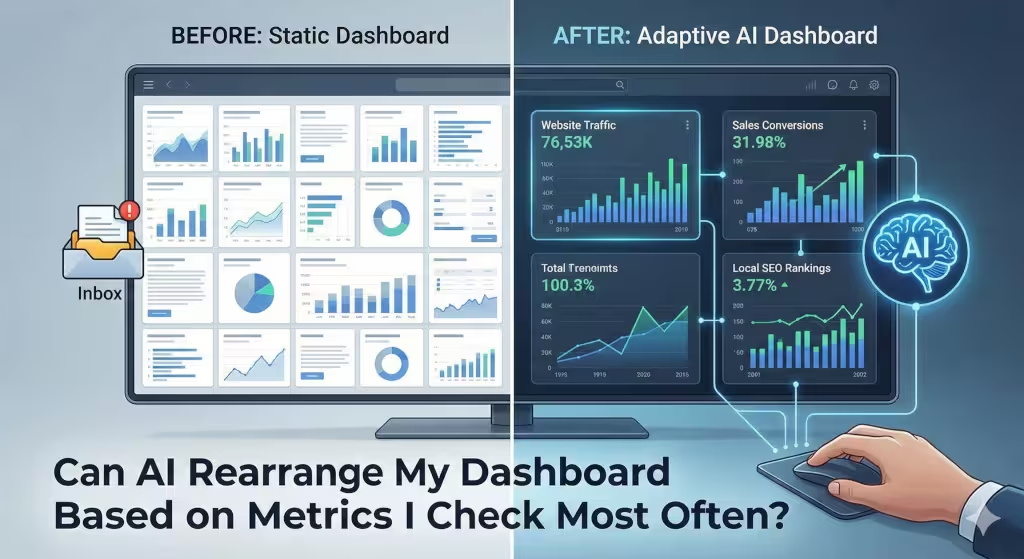
Many owners struggle with the same problem each day. You open your computer, ready to start the day, and you are met with a wall of numbers. It is messy. It is loud. You spend twenty minutes clicking through tabs just to find the one number that actually tells you if you made money yesterday. This is more than just a minor annoyance. It is a drain on your energy, which we call data fatigue. When you cannot find what you need, you stop looking. When you stop looking, you lose control of your business. But what if your digital tools were smart enough to get out of your way? What if they could learn what you care about?
The short answer to your question is yes. Artificial intelligence can absolutely rearrange your dashboard based on what metrics you check most often. We are moving away from the old way of doing things. In the past, a dashboard was a static piece of digital paper. It stayed the same until a programmer changed it. Today, we use what experts call Intelligent User Interfaces. These systems use a type of machine learning called reinforcement learning. This means the software watches how you work. If you always scroll down to see your local SEO traffic, the AI notices.
Over time, it moves that chart to the top. It makes the important things big and the less important things small. This is not just a fancy trick. It is a technical requirement for any modern business that wants to stay ahead of the competition.
The Death of the Static Dashboard
For a long time, every person in a company looked at the exact same screen. The CEO looked at the same dashboard as the marketing intern. This does not make sense. Different roles need different data. Even more importantly, your own needs change over time. During a holiday sale, you might want to see your sales every hour. During a slow month, you might care more about your long term SEO goals. A static dashboard cannot keep up with these changes. It is a fixed tool for a world that never stops moving.
We are now entering the era of the adaptive workspace. This means your dashboard changes its shape to fit your habits. It is like a desk that moves your favorite pens closer to your hand when you reach for them. By using AI to handle the layout, we solve the problem of information overload. You no longer have to hunt for your data. The data finds you. This shift is vital for small business owners who do not have hours to spend on data analysis.
The Mechanics: How AI Learns Your Workflow
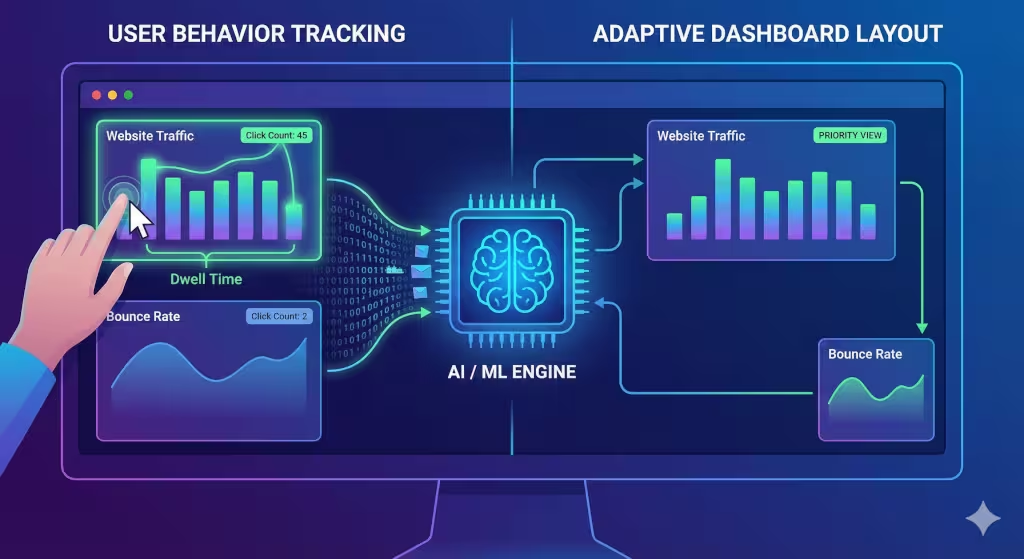
How does a computer actually know what you want to see? It starts with user behavior tracking. Think of this like a digital footprint. Every time you click a widget on your dashboard, the system logs that action. It measures how long your mouse hovers over a specific chart. This is called dwell time. If you spend three minutes looking at your Google Business Profile views but only two seconds looking at your bounce rate, the AI learns your priorities.
The system also uses something called collaborative filtering. This is the same logic that Netflix uses to suggest movies. If other small business owners in your industry are all looking at “local map pack” rankings, the AI might suggest moving that metric to the center of your dashboard. It learns from the group to help the individual.
Another cool feature is context aware resizing. If a metric starts to show a strange pattern, like a sudden drop in website traffic, the AI can expand that chart automatically. It makes the widget larger so you cannot miss it. It brings the fire to your attention before the whole building burns down. This is predictive surfacing. The AI anticipates what you will need based on the time of day or even the day of the week.
Key Technologies Driving Personalization
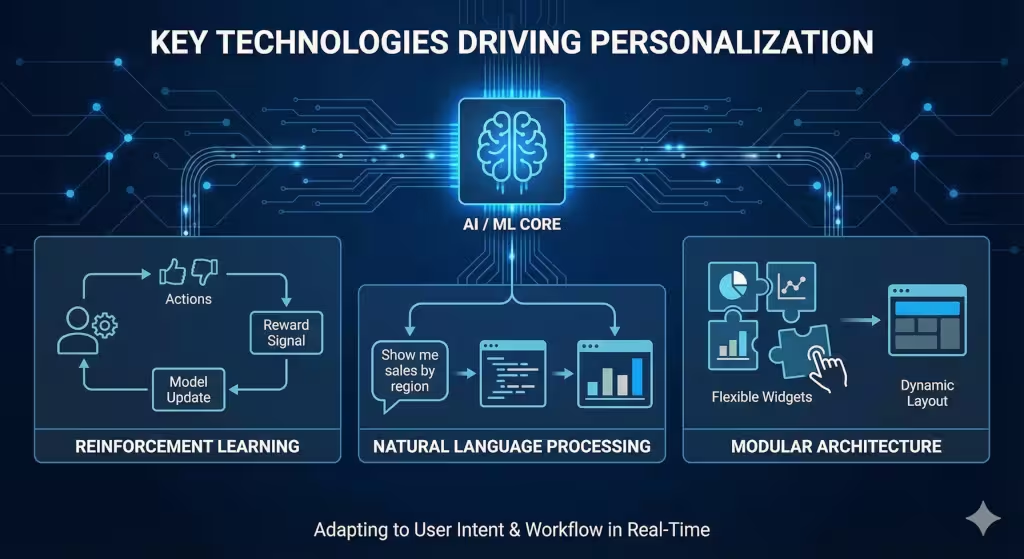
The magic behind a smart dashboard comes from a few specific technologies. The first is Reinforcement Learning from Human Feedback. This is a fancy way of saying the AI tries something and waits to see if you like it. If the AI moves a chart and you click it more often, the AI gets a “reward.” If you move it back, the AI learns it made a mistake.
We also use Natural Language Processing. This allows you to talk to your data. You might type, “Show me my best SEO keywords from last month,” and the dashboard will change instantly to show that view. It turns a complex database into a conversation.
Finally, there is the modular architecture. To let an AI rearrange things, the dashboard cannot be one solid block. It must be made of flexible grids and smart widgets. These are like digital LEGO bricks. They can be moved, resized, or hidden by the AI without breaking the whole system. This flexibility is what allows for a truly personal experience.
Answers to Common Questions about Dashboards
Many people ask if AI can create a dashboard from scratch. The answer is yes. This is called Generative BI (Business Intelligence). You can give the AI a list of your data sources and tell it what your goals are. It will build a layout for you in seconds. It is a great starting point for those who are not tech savvy.
Another common question is how to automate updates. Modern tools connect directly to your data sources. Whether it is your point-of-sale system or your social media accounts, the data flows in real time. You do not have to hit a refresh button anymore. The dashboard is always alive.
People also want to know which software is the best. For small businesses, tools like Tableau Pulse or certain versions of Power BI are leading the way. Even simpler tools like Monday.com are starting to use AI blocks that can be customized easily. The best tool is the one that you actually find easy to use.
Strategic Benefits for Small Businesses
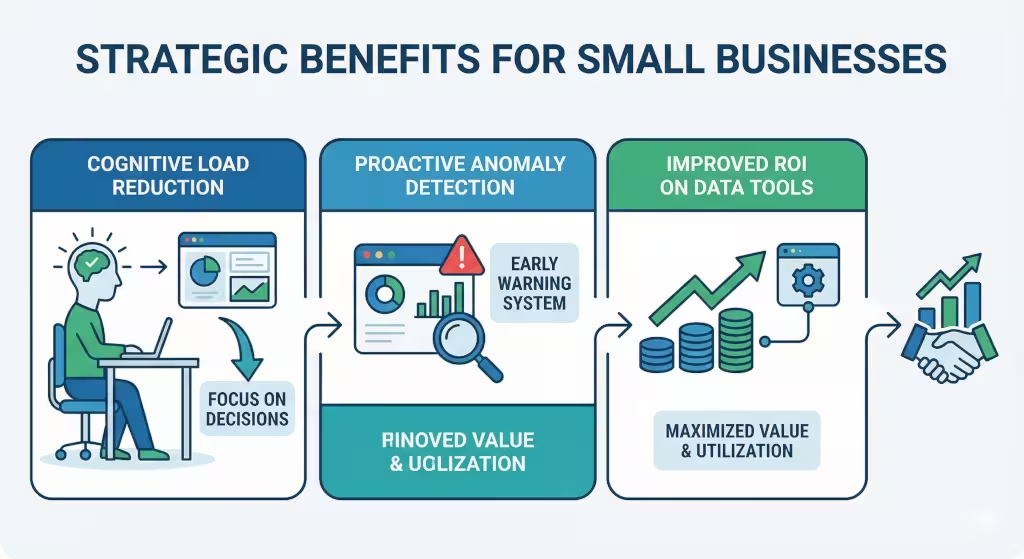
The biggest benefit of a smart dashboard is that it lowers your cognitive load. Running a business is stressful. You have a thousand things on your mind. You should not have to use your brain power just to navigate a messy screen. When the AI hides the metrics you do not use, your mind can stay clear. You can focus on making decisions instead of searching for facts.
It also helps with anomaly detection. A standard dashboard shows you what is happening. A smart dashboard tells you what is wrong. If your SEO traffic from your local neighborhood drops by 20%, the AI can highlight that specific dashboard widget in red. It pulls the most important news to the top. This saves you from having to check every single number every single day.
For a small business, this means a better return on your investment. Business intelligence software can be expensive. If your team finds it hard to use, that money is wasted. An AI that adapts to each employee ensures that everyone is actually using the data to grow the business.
Related Concepts
To really understand this topic, we have to look at several related ideas. We talk about predictive analytics, which is using past data to guess the future. We look at UI/UX personalization, which is about making software feel like it was built just for you. There is also the idea of a “heuristic analysis.” This is a way of testing if a dashboard is actually easy to use.
In the world of SEO and business, we also track specific entities. This includes tools like Google Analytics 4, which is the gold standard for web data, or Matomo Analytics as an open-source option. We look at Salesforce Einstein for sales data and Microsoft Fabric for big data management. All of these tools are moving toward the same goal: an adaptive, AI driven dashboard that puts the user first.
Implementation: Moving Toward an Adaptive Workspace
If you want to start using this technology, the first step is to audit your data. Look at all the places your business stores information. Is it in a spreadsheet? Is it in a cloud app? You need to know where the data is before you can put it on a dashboard.
Next, you should look for a platform that offers Generative BI or AI driven insights. Do not settle for a tool that only shows static charts. Ask the vendor if the software can learn from user behavior. You want a system that gets smarter the more you use it.
Finally, you must establish feedback loops. Even the best AI needs a little guidance. Make sure you and your team are actively telling the system what is helpful. If the AI moves a dashboard widget and it helps you work faster, take a second to acknowledge that. Over time, your digital workspace will become a perfect reflection of your business needs.
The Value of Local SEO and Data
As an expert at WebHeads United, I have to mention how this relates to your community. A smart dashboard can be tuned to show you exactly how people in your town are finding you. It can track keywords like “near me” or “best in [City Name].” When your dashboard is optimized, you can see which neighborhoods are sending you the most customers. This is the heart of local SEO. By using AI to track these specific metrics, you can spend your marketing budget more wisely. You can see which local search trends are rising and react before your competitors do.
A well organized dashboard is like a map for your business. It shows you where you are and where you are going. When that map is powered by AI, it even tells you which roads are closed and where the shortcuts are. It turns raw data into a competitive advantage.
Managing Your Digital Assets
Your data is an asset, just like your inventory or your building. You should treat it with respect. A cluttered dashboard is like a messy warehouse. It makes it hard to get work done. By letting AI help you organize your view, you are practicing good data integrity. You are ensuring that the most accurate and important information is always front and center.
This is especially important for small businesses in New York or other busy hubs. The pace of business here is incredibly fast. You do not have time for slow tools. You need a dashboard that moves at the speed of your thoughts. You need a system that understands that time is your most valuable resource.
Your Partner in Growth
In the end, technology should serve you. You should not be a slave to your software. The goal of using AI to rearrange your dashboard is to give you your time back. It is about making the complex feel simple. As an INTJ, I value competence and efficiency above all else. I believe that an adaptive dashboard is the most efficient way to manage a modern company. It is an innovation that actually lives up to the hype.
If you are ready to stop hunting for data and start using it, then it is time to look at AI. It is time to move beyond the static screen. Let your tools learn from you. Let your dashboard become a living part of your team. When your data is organized, your mind is organized. And when your mind is organized, there is no limit to how much your small business can grow.
Bonus: A List of Common Dashboard Platforms
At WebHeads United we are happy to provide this detailed guide. We are going to look at the top five platforms that help you build a smarter dashboard. These tools use the latest technology to ensure your data is always easy to find. In our previous discussion, we talked about how a dashboard can learn your habits. Now, we will see which specific tools are leading the way.
These platforms have been analyzed these platforms based on their ability to reduce your workload. We want a dashboard that works for you, not the other way around. Below is the detailed breakdown of the best tools for your business, followed by the rest of our deep dive into adaptive data systems.
Top 5 AI Driven Dashboard Platforms for Small Businesses
- Fabi.aiIf you are a small business owner who wants a dashboard that feels like a person, Fabi is the top choice. It is an AI native tool. This means it was built with artificial intelligence in its DNA. Instead of dragging and dropping boxes, you can just talk to your data. You might ask your dashboard why sales are down in a certain zip code. The system will look through your numbers and give you an answer. It even connects to Google Sheets and Stripe. It is very helpful for people who are not tech experts. It focuses on making your dashboard a place for conversation rather than just a place for looking at charts.
- Tableau PulseTableau is a giant in the world of data, and their Pulse feature is a game changer. It creates a personalized experience for every user. Instead of a giant, messy dashboard, it gives you a “digest” of the metrics you follow. It is like a news feed for your business numbers. If you check your local SEO rankings every day, Pulse will make sure those are at the top of your view. It also sends alerts to your phone if something looks wrong. This helps you keep a clean dashboard that only shows what matters right now.
- Microsoft Power BI with CopilotFor many small businesses, the Microsoft ecosystem is home. If you already use Excel or Teams, Power BI is a natural fit. With the new Copilot tool, you can ask the AI to build your dashboard for you. You can literally type a sentence like “reorganize this dashboard to focus on customer growth” and the AI will move the widgets for you. It uses smart layout logic to make sure the most important facts are big and easy to read. It saves a lot of time on design decisions.
- Klipfolio PowerMetricsKlipfolio is known for being very friendly to smaller teams. Their PowerMetrics tool focuses on a “metric first” approach. This means you define what you want to track, and the AI helps you build the right dashboard views. It has a centralized catalog of metrics. This ensures that everyone in your company is looking at the same truth. The AI assistant in this platform helps you find patterns in your data that you might have missed. It is a great way to build a data driven culture without needing to hire a data scientist.
- ThoughtSpotThoughtSpot is famous for its search based analytics. Think of it like a search engine for your business data. Their AI analyst, called Spotter, lets you ask questions in plain English. It then creates a dashboard view on the fly. This is perfect for the business owner who has different questions every day. You are not stuck with one layout. Your dashboard is whatever you need it to be at that moment. While it can be more expensive, their “Essentials” plan is designed to help growing companies get started with high level AI.