Color is a silent language. Long before a visitor reads a single word of your copy or clicks a button, they have already formed a subconscious judgment about your website. That judgment is based almost entirely on color. In fact, studies show that color increases brand recognition by up to 80% and that nearly 85% of consumers cite it as the primary reason they buy a particular product. Color speaks volumes about your brand’s personality, professionalism, and trustworthiness.
When used correctly, it guides users, clarifies actions, and creates a seamless, enjoyable experience. But when used incorrectly, it creates confusion, frustration, and distrust. Many beautifully designed websites fail to connect with their audience not because of their content or functionality, but because they fall victim to simple, avoidable color mistakes.
These color mistakes are not just aesthetic missteps; they are fundamental usability errors that can cripple your conversion rates and alienate a significant portion of your potential audience. From choosing hues that make your text unreadable to creating a visual cacophony that overwhelms the user, these common color mistakes can undo all the hard work you’ve put into your site. The good news is that they are entirely correctable.
This article will serve as your expert guide, identifying the most common and damaging color mistakes in web design. More importantly, we will provide you with the theory, tools, and actionable solutions needed to fix them, transforming your website into a visually harmonious, accessible, and highly effective digital space.
Mistake 1: Insufficient Contrast and Poor Readability

Of all the potential color mistakes a designer can make, this is unequivocally the most severe. Insufficient contrast between your text and its background directly impacts usability and accessibility, making your website difficult or even impossible for many people to read. When a user has to squint and strain to decipher your content, they won’t stick around for long.
This isn’t a matter of taste; it’s a fundamental failure of communication. Your bounce rate will increase, your message will be lost, and you will exclude users with visual impairments like low vision or color blindness. In the world of web design, readability is not a feature—it is the foundation upon which everything else is built. Ignoring this is one of the most damaging color mistakes you can commit.
The standard for web accessibility is governed by the Web Content Accessibility Guidelines (WCAG). These guidelines provide a mathematical way to measure the contrast between two colors, known as the contrast ratio. The scale ranges from 1:1 (white text on a white background) to 21:1 (black text on a white background). To be considered accessible, WCAG has two main levels of compliance:
- Level AA: This is the most common target for websites. It requires a contrast ratio of at least 4.5:1 for normal text and 3:1 for large text (which is roughly 18 point or 14 point bold).7
- Level AAA: This is a stricter standard, often required for government websites or those specifically serving users with disabilities. It demands a contrast ratio of at least 7:1 for normal text and 4.5:1 for large text.
You don’t need to guess whether your colors meet these standards. There are dozens of free, user-friendly tools available to help you avoid these particular color mistakes. Adobe Color’s Contrast Checker, WebAIM’s Contrast Checker, and the WAVE Web Accessibility Evaluation Tool are excellent resources. You simply input your foreground (text) and background hex codes, and the tool will instantly tell you your contrast ratio and whether you pass AA and AAA compliance.
Let’s look at a practical example. A trendy design might feature light gray text (#999999) on a white background (#FFFFFF). It may look minimalist and clean to the designer, but the contrast ratio is a mere 2.32:1. This fails both AA and AAA standards, making it very difficult for many users to read. This is a classic example of a preventable color mistake.
A simple fix would be to darken the gray to a charcoal color (#4A4A4A). This maintains a sophisticated feel but boosts the contrast ratio to 7.05:1, easily passing both AA and AAA standards for all text sizes. By making this small adjustment, you avoid one of the web’s most common color mistakes and ensure your content is accessible and legible to everyone.
Mistake 2: Overusing Colors (The “Rainbow” Effect)

When you have an entire spectrum of colors at your fingertips, it can be tempting to use too many of them. Designers, especially those new to the field, sometimes believe that more color equals more visual interest. In reality, the opposite is true. Bombarding a user with a riot of competing colors creates visual noise and cognitive overload. When everything is shouting for attention, nothing stands out. This chaotic approach, one of the most amateur color mistakes, makes it impossible for users to develop a visual hierarchy. They don’t know where to look first, what’s important, or what is clickable. Instead of guiding the user, you confuse them, and a confused user will almost always leave.
A professional and effective color palette is disciplined and restrained. It doesn’t use color just for decoration; it uses color with purpose. To avoid these kinds of color mistakes, designers should rely on established principles of color harmony. The most practical and widely used of these is the 60-30-10 Rule. This is a timeless interior design concept that translates perfectly to the digital screen. It provides a simple framework to create a balanced and harmonious palette:
- 60% is your Dominant/Primary Color: This color will anchor your design and cover the most visual space. It’s often a neutral, like a soft white, a light gray, or a muted beige. It acts as the canvas for your design.
- 30% is your Secondary Color: This color is used to create contrast with the dominant hue. It should be used for elements of medium importance, such as subheadings, content blocks, or secondary buttons. It adds visual interest without overpowering the main color.
- 10% is your Accent Color: This is your most vibrant color, reserved for the most important elements on the page—the ones you absolutely want your user to see and interact with. This includes calls-to-action (CTAs) like “Buy Now” or “Sign Up,” important notifications, and other key interactive elements.
Imagine a modern tech website. The 60% dominant color might be a clean off-white (#F5F5F7). The 30% secondary color could be a deep, trustworthy blue (#007AFF), used for headlines and informational icons. The 10% accent color might be a bright, energetic orange (#FF9500), used exclusively for the “Request a Demo” buttons. This structure creates instant clarity. The user’s eye is naturally drawn to the orange accent, making the primary conversion goal obvious. By adhering to this simple rule, you can easily sidestep the common color mistakes associated with an overly complex palette and create a design that is both beautiful and intuitive. Avoiding these color mistakes isn’t about limiting creativity; it’s about channeling it effectively.
Mistake 3: Ignoring Color Psychology and Cultural Context
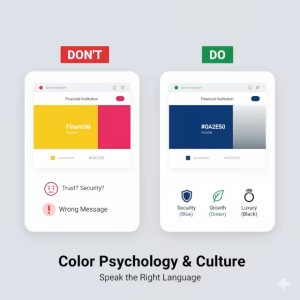
Choosing colors based solely on your personal preference is one of the most subtle yet significant color mistakes you can make. Colors are not just aesthetic choices; they are powerful psychological triggers steeped in cultural meaning. The hues you select for your website communicate a wealth of information about your brand’s personality, values, and intentions. A bank that uses a playful, bright yellow as its primary color will struggle to be seen as secure and trustworthy. A health and wellness blog that uses an aggressive, alarming red will have a hard time conveying a sense of calm and well-being. These are clear color mistakes that stem from a misunderstanding of how color affects human emotion.
In Western cultures, we have developed strong, often subconscious associations with different colors. Understanding these is critical for any designer:
- Blue: This is the color of trust, security, stability, and professionalism. It’s no accident that it’s overwhelmingly used by financial institutions (Chase), social media giants (Facebook, LinkedIn), and tech companies (IBM, Dell).
- Red: Red is a color of passion, urgency, excitement, and danger. It’s excellent for creating a sense of urgency, which is why it’s often used for clearance sales and “Order Now” buttons. However, overuse can create feelings of anxiety or alarm.
- Green: Green is universally associated with nature, health, growth, and wealth. It is the go-to color for brands in the organic, environmental, and financial sectors. It can create a sense of calm and permission, which is why it is often used for “success” messages.
- Yellow: Yellow evokes feelings of optimism, happiness, and friendliness. It’s eye-catching and youthful. However, some shades can appear cheap or cause eye fatigue if overused, making it a source of potential color mistakes if not handled carefully.
- Orange: A blend of red’s energy and yellow’s friendliness, orange is enthusiastic and creative. It’s a great choice for calls-to-action as it stands out without being as aggressive as red.
- Black: Black signifies luxury, power, sophistication, and elegance. It is heavily used by high-end fashion and technology brands to convey a sense of premium quality.
- Purple: Historically associated with royalty, purple communicates wisdom, creativity, and luxury. It can make a brand feel both imaginative and distinguished.
However, these meanings are not universal. Making assumptions about color is one of the biggest color mistakes when designing for a global audience. For example, while white symbolizes purity and weddings in the West, it is the color of mourning in many Eastern cultures. Similarly, red is the color of good fortune and prosperity in China, a far cry from its Western association with danger. Failing to research the cultural context of your target market is a critical oversight.
Before finalizing your palette, ask yourself: Who is my audience? What emotions do I want to evoke? What are the cultural connotations of these colors for my users? Answering these questions will help you avoid embarrassing and ineffective color mistakes and instead build a brand that resonates deeply and appropriately with its intended audience.
Mistake 4: Disregarding Color Blindness
When you design your website, you are likely working on a high-resolution, perfectly calibrated monitor, seeing every color exactly as you intended. But a significant portion of your audience does not see the world the same way. Approximately 8% of men and 0.5% of women have some form of color vision deficiency (CVD), commonly known as color blindness. This means that for a large number of users, certain colors are indistinguishable from one another. One of the most common and unforgivable color mistakes in modern web design is creating an experience that relies solely on color to convey critical information.
The most prevalent form of CVD is red-green color blindness (Deuteranopia and Protanopia). To someone with this condition, reds, greens, and oranges can all appear as murky shades of brownish-yellow and result in a color mistake. Now, imagine your website uses red for error messages and green for success messages without any other visual cue. To a color-blind user, these two critically different states could look almost identical. This is not a minor inconvenience; it is a complete failure of communication. A user might not realize their password was entered incorrectly or that their purchase was successful. These are serious usability color mistakes.
The solution is not to avoid using red and green. The solution is to ensure that color is never the only method used to communicate information. This is a core principle of inclusive and accessible design. You must supplement color with other visual indicators.
- Use Icons: Accompany error messages with a clear ‘X’ icon and success messages with a checkmark (✓). This provides an immediate, universally understood visual cue that does not depend on color perception.
- Use Text Labels: Instead of just turning a form field’s border red, add a clear text label underneath that says, “This field is required.”
- Use Patterns and Textures: When presenting data in graphs and charts, don’t just use different colors for different data sets. This is one of the most common color mistakes in data visualization. Instead, use different patterns (stripes, dots, cross-hatching) in addition to color to make the segments distinguishable.
- Underline Links: Don’t just make links a different color from the body text. Ensure they are also underlined, especially within a paragraph, so users who cannot perceive the color difference can still identify them as clickable.
You can and should test your designs for these potential color mistakes. Many design tools like Figma and Sketch have built-in color blindness simulators. Browser developer tools in Chrome and Firefox also allow you to simulate different types of CVD on any live webpage. Using these tools takes only a few seconds and provides invaluable insight into how a large portion of your audience experiences your site. Designing with accessibility in mind from the start helps you avoid these color mistakes and demonstrates that you value every user, regardless of their visual ability.
Mistake 5: Using Pure Black and Pure White
This may sound counterintuitive. After all, what could be more readable than pure black text (#000000) on a pure white background (#FFFFFF)? It provides the maximum possible contrast ratio of 21:1. While this is technically true, in the world of digital screens, maximum contrast is not always optimal. Staring at the harsh glare of pure black text on a stark white background can cause a phenomenon known as halation, where the high contrast causes the letters to appear to vibrate or shimmer, leading to significant digital eye strain and fatigue, especially during long reading sessions. This is one of the more subtle color mistakes, but it has a real impact on user comfort.
Think about reading a physical book. The paper is rarely a brilliant, clinical white; it’s often a softer, off-white cream. The ink is a dark charcoal, not a bottomless jet black. This combination is naturally easier on the eyes. We can replicate this more organic and comfortable reading experience on screen by avoiding the extremes of the color spectrum. Making this simple adjustment is an easy way to correct one of the most overlooked color mistakes.
Instead of using pure black for your body text, opt for a very dark gray or a soft black, such as #333333 or #212121. This color will appear black to the user at a glance, but its reduced intensity lessens the harshness and makes reading more comfortable over time. It still provides a more than sufficient contrast ratio on a light background, easily passing WCAG standards.
Similarly, instead of using a pure white background, consider a slightly off-white, light cream, or very light gray, like #FAFAFA or #F8F8F8. This small shift dramatically reduces the glare coming from the user’s screen without making the page look dingy or gray. It creates a softer canvas that allows the content to be the focus, rather than the blinding background.
This is not a hard and fast rule for every single element. Pure black can still be effective for bold headlines or in designs that are intentionally stark and minimalist. However, for large blocks of text where you want users to read and engage for extended periods, avoiding the harshness of pure black on pure white is a professional touch that significantly improves the user experience. Correcting these kindsamazing color mistakes shows a level of care and attention to detail that sets a great website apart from a good one.
Mistake 6: Inconsistent Color Application
Imagine you are driving a car. You know that a red light means stop, yellow means caution, and green means go. These colors are used consistently everywhere, which is why the system works. Now, what if you drove into a town where stop lights were purple and green meant “slow down”? You would be completely lost and confused. This is exactly what happens to a user on a website that suffers from inconsistent color application. This is one of the most disorienting color mistakes because it breaks the user’s learned patterns and erodes their trust in your interface.
Consistency is key to creating an intuitive user experience. Users learn the “rules” of your site very quickly. If they see that all clickable links are blue on one page, they will expect all blue text to be clickable throughout the entire site. If your primary “Add to Cart” button is green, they will look for that green button on every product page. When you start changing these colors arbitrarily from page to page, you force the user to re-learn your interface at every step. This increases their cognitive load and creates a frustrating, unprofessional experience. These color mistakes make your website feel fragmented and untrustworthy.
To prevent these color mistakes, you must establish and adhere to a UI style guide. This doesn’t have to be an elaborate, hundred-page document. At its core, it’s a simple reference that defines the specific purpose for each color in your palette. Your style guide should clearly define the hex codes for:
- Primary Action Color: The color used for your most important buttons (e.g., “Buy Now,” “Sign Up,” “Submit”). This color should be used consistently for this purpose and nothing else.
- Secondary Action Color: For less important actions, like “Cancel” or “View Details.”
- Text and Link Color: The specific colors for body text, headlines, and hyperlinks.
- Notification Colors: A standardized set of colors for system messages. Typically, this is green for success, red for errors, yellow for warnings, and blue for informational messages.
By creating this simple set of rules, you ensure that your design team—whether it’s one person or fifty—is applying color consistently across every page and every component of the website. This consistency builds a strong sense of brand identity and, more importantly, it creates a predictable and effortless experience for the user. They no longer have to think about what a color means; they just know. Avoiding the color mistakes of inconsistency is one of the simplest yet most powerful ways to improve the usability and professionalism of your website.